
 FileMaker is a database system that can be adapted extremely well to individual company requirements thanks to its flexible interfaces. Data can be imported from almost any other database and from Office applications such as Microsoft Excel, Word or Apple Numbers. FileMaker databases can be run on Windows or Mac OS X computers, the iPad, iPhone and iPod touch, making them ideal for mobile data collection. This article explains how a new project for the development of a FileMaker database works, which requirements should be met and what you can do yourself to prepare a development project.
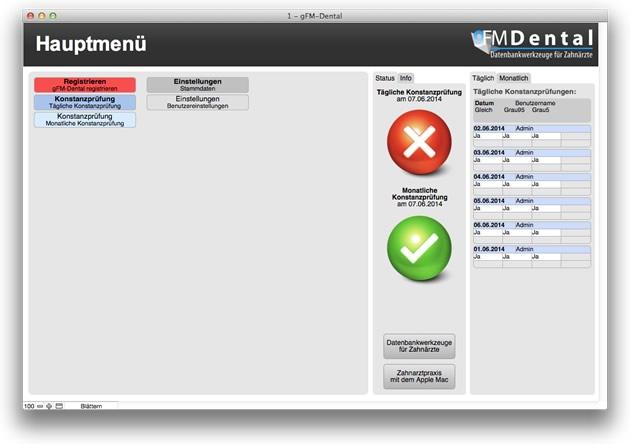
gFM-Dental 1.1 contains constancy test according to DIN 6868-157.
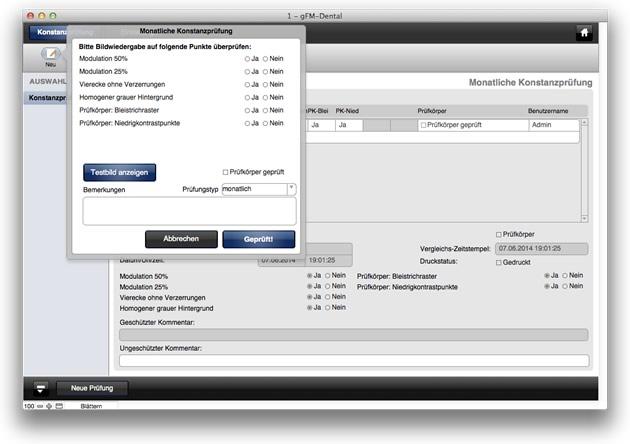
The null software for dentists available on the FileMaker specialist portal goFileMaker now includes the option of carrying out the daily constancy test of diagnostic monitors of digital X-ray devices in accordance with the new DIN 6868-157 guideline under Apple Mac OS X. gFM-Dental 1.1 contains a corresponding test image for carrying out the constancy test in accordance with the new standard. A technical article explains ... Read more
 In another presentation at the FileMaker Conference 2012, I showed ways to optimize screen layouts and navigation within a FileMaker solution. First, I provided an overview of the methods and technologies that can be used to implement database-supported navigation in FileMaker. In a short excursion into GUI studies, I show how a graphical user interface should look and be structured according to the current scientific state of the art. Finally, using a practical example, I show how database-supported navigation can be implemented in a FileMaker solution with pure on-board resources without plug-ins.
 At this year's FileMaker conference in Salzburg, I gave a presentation on how to connect a FileMaker database to other systems such as online stores, content management systems like WordPress or Typo3 or other SQL databases. In my presentation, I used a connection from FileMaker to an xt:Commerce or Gambio online store as an example. I will show you a method for easily integrating any external database that can be accessed via ODBC into a FileMaker database. In this way, data from all kinds of third-party systems can be integrated into a FileMaker solution and brought to the PC or Mac desktop and, with FileMaker Go, to the iPad, iPhone or iPod touch.
 A long-time friend calls me and gives me a voucher for 12 months of Sky World and all HD channels for free until the end of the year. Even though I only get a few hours of TV a week myself - four new children's channels, after all, and thanks to the HD channels I can even watch the first half of the Bundesliga. The connection fee and delivery costs were also included, and the required digital receiver and smartcard were delivered free of charge. Hey, I liked being able to get a taste of the Sky world in this way and completely free of charge, so I was very pleased and gratefully redeemed the voucher.