
 FileMaker is a database system that can be adapted extremely well to individual company requirements thanks to its flexible interfaces. Data can be imported from almost any other database and from Office applications such as Microsoft Excel, Word or Apple Numbers. FileMaker databases can be run on Windows or Mac OS X computers, the iPad, iPhone and iPod touch, making them ideal for mobile data collection. This article explains how a new project for the development of a FileMaker database works, which requirements should be met and what you can do yourself to prepare a development project.
Where do you want to go?
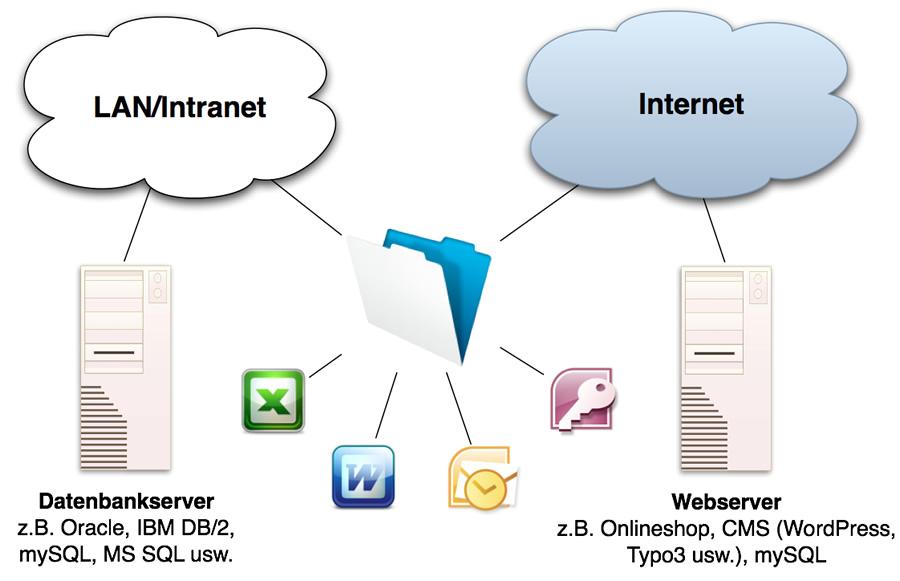
This question is almost always asked at the start of a new FileMaker project. In most companies, a wide variety of data accumulates over time on workstations and servers, be it Excel spreadsheets, Word documents, PDF documents, e-mails, mail attachments or even data released by other database servers (e.g. Oracle, IBM DB/2, Microsoft SQL, etc.). It is not uncommon to want to master this flood of data and/or merge data from various other databases into a FileMaker solution.
The first step should therefore be to outline which functions the FileMaker solution should have and which third-party systems it should be connected to. With third-party systems, there is also always the question of whether FileMaker should only read data or also write it back to other database systems.
Concept and specifications
Once all the desired functions have been roughly outlined, the next step is to create a detailed concept and a specification sheet for the development of the project. A typical project concept includes the following points:
- Structure of the data structure
- Structure and arrangement of screen and print layouts
- Program structure (functions)
The project concept should specify which data tables are available and how they must be linked to each other. Example: If a requirement is defined to store exactly one contact person for each data record, only one field for the contact person is required in the master table. However, if the requirement is to store any number of contact persons per data record, an additional table for the contact persons must be created for this purpose.
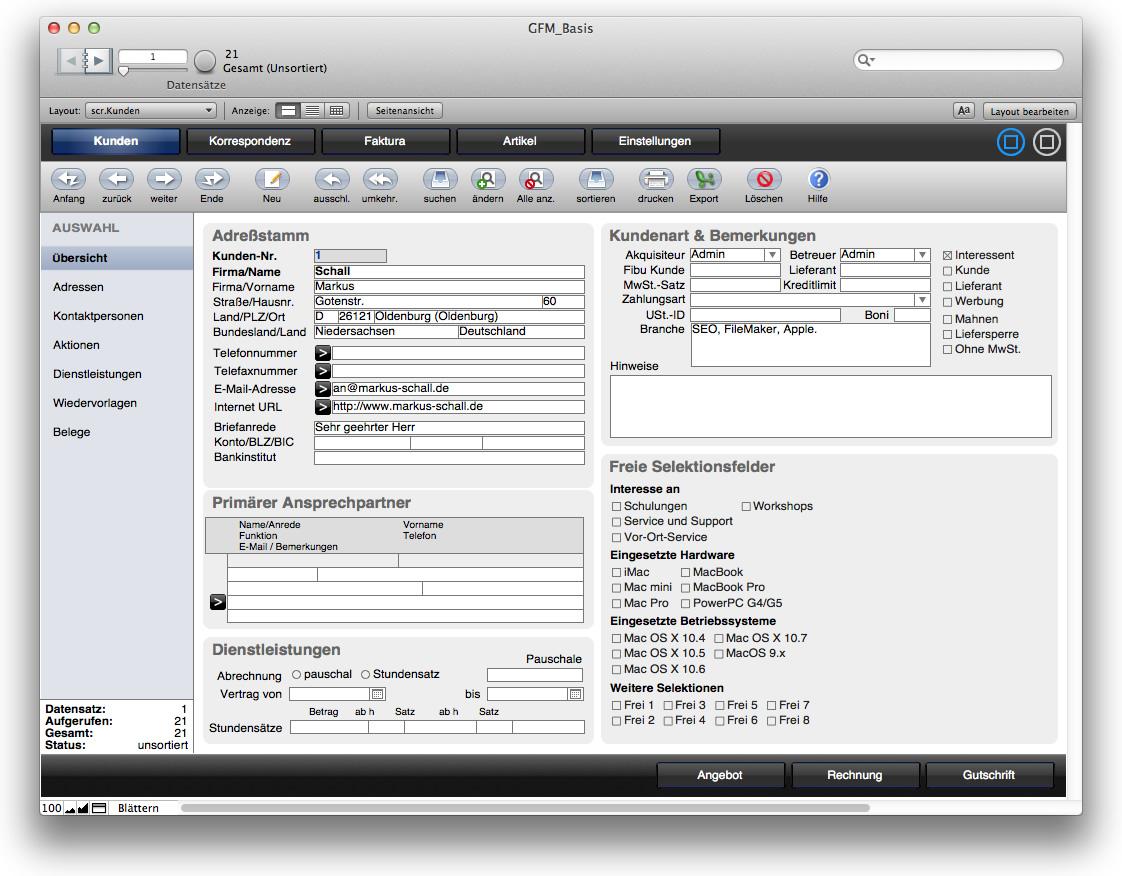 In order to be able to assess the functionality of the finished FileMaker solution for visual feasibility during the project planning phase, all screen layouts, list layouts and print layouts as well as their approximate visual structure should be outlined in the specifications. In this way, all screen layouts, including navigation, can already be implemented as part of the first milestone.
The program structure is documented in the concept in such a way that all the functions that the FileMaker solution should ultimately have are outlined. During the development of the software, the developer documents in the performance log how the functions were implemented, e.g. which scripts were programmed or which layouts were used for the respective functions.
To ensure that the development of the project is not disrupted during the development period and that parts may have to be redeveloped later, all requirements and the estimated time frame should be outlined in as much detail as possible in the requirements specification. For a better overview and calculability, the time frame of the overall project is usually divided into so-called milestones.
The development phase
Once the concept and specifications have been completed, the development of the first milestone begins. This usually includes the basic structure of the software and the first navigation between screen layouts. During the development phase, the developer documents each work step in the service log, which serves as the basis for billing if remuneration is based on time. As soon as a milestone has been completed, the client receives a test version in which he can check whether his requirements have been fully implemented up to the current previous version.
The test phase
Once all milestones have been completed, the software is in the so-called "beta stage" and is submitted to the client for review and testing. The software is now tested by the client in a test environment. During the test phase, it must be ensured that each function of the software is tested several times and, if possible, under different conditions.
The client can report errors directly in the software using a special reporting system. All error messages are collected in an error tracking log to which the client and the developer have access. Based on this log, the developer can see which errors still need to be rectified and the client can see which errors have already been rectified by the developer.
User documentation
Depending on the client's requirements, documentation for the users of the solution is created once the FileMaker solution has been completed. If the realization of the project was carried out in close cooperation with the future users, the creation of user documentation may not be necessary in practice.
Here we go: the rollout
 Once all reported errors have been eliminated during the test phase and the FileMaker solution has been approved by the client for the production phase, the solution is rolled out, i.e. installed on the workstations and, if necessary, on the server. Depending on the environment in which the FileMaker solution is to be used, Windows PCs, Apple Macintosh, Apple iPad, iPhone or iPod touch can be used. When using a FileMaker server, the databases on the FileMaker server and a suitable backup strategy are now set up. After a short test of each FileMaker client, the development is complete and you can start using the FileMaker solution in the production environment.
Further questions about individual databases?
This article explains the typical procedure for developing individual databases with FileMaker Pro. On this website you will find more information about the Optimization of business processes with FileMaker, FileMaker Database development and the Tariff models. Of course, we will also be happy to answer any further questions you may have in person.

Very interesting! I've been thinking about having a kind of "hub" developed for my data for some time. My company has an ancient Dos database and a newer SQL database that runs on Windows and an accounting database that also runs on Windows. Is it possible to merge all this data in FileMaker and possibly even run it on the iPad?
Well, with the DOS database it depends on whether and in what form it can be accessed or export data. Actually, there is always something that can be done if you look at the details. As soon as the data is in FileMaker, iPad or iPhone is of course no problem. Just call through 🙂