
While MLX originally started as an experimental framework from Apple Research, a quiet but significant development has taken place in recent months: With the release of FileMaker 2025, Claris has firmly integrated MLX into the server as a native AI infrastructure for Apple Silicon. This means that anyone working with a Mac and relying on Apple Silicon can not only run MLX models locally, but also use them directly in FileMaker - with native functions, without any intermediate layers.


The boundaries between local MLX experiment and professional FileMaker application are beginning to blur - in favor of a fully integrated, traceable and controllable AI workflow.
The new AI area in the FileMaker server: "AI Services"
At the heart of this new architecture is the "AI Services" area in the Admin Console of FileMaker Server 2025, where developers and administrators can:
- activate the AI Model Server,
- Manage models (download, provide, fine-tune),
- Assign API keys for authorized clients,
- and monitor the ongoing AI operations in a targeted manner.
If the FileMaker server is running on a Mac with Apple Silicon, the integrated AI Model Server automatically uses MLX as the inference backend. This brings with it all the advantages that MLX offers on Apple devices: high memory efficiency, native GPU usage via Metal, and a clear separation of model and infrastructure - just like in the Apple world.
Provision of MLX models directly via the server console
Deploying an MLX model is easier than expected: In the AI management console, supported models can be selected directly from a growing list of Claris-compatible language models and deployed on the installier server. These are open source models (e.g. variants of Mistral, LLaMA or Phi) that are available in .npz format and have been specially converted for MLX. At present (as of September 2025), however, the number of available models is still quite limited.
Alternatively, you can prepare your own models - for example by converting hugging face models with the mlx-lm tool. With a single command, you can download a model, quantize it and convert it to the appropriate format. This can then be made available in the server directory - according to the same scheme that Claris uses internally. Once installiert, these models are immediately available for all supported AI functions within FileMaker.
Native AI functions in FileMaker Pro: scripting instead of detours
What used to run via external APIs, REST calls and manually built JSON routines is now available in FileMaker 2025 in the form of dedicated script commands. Once an AI account is set up - with the name of the model and the connection to the server - AI tasks can be seamlessly integrated into the user interface and business logic.
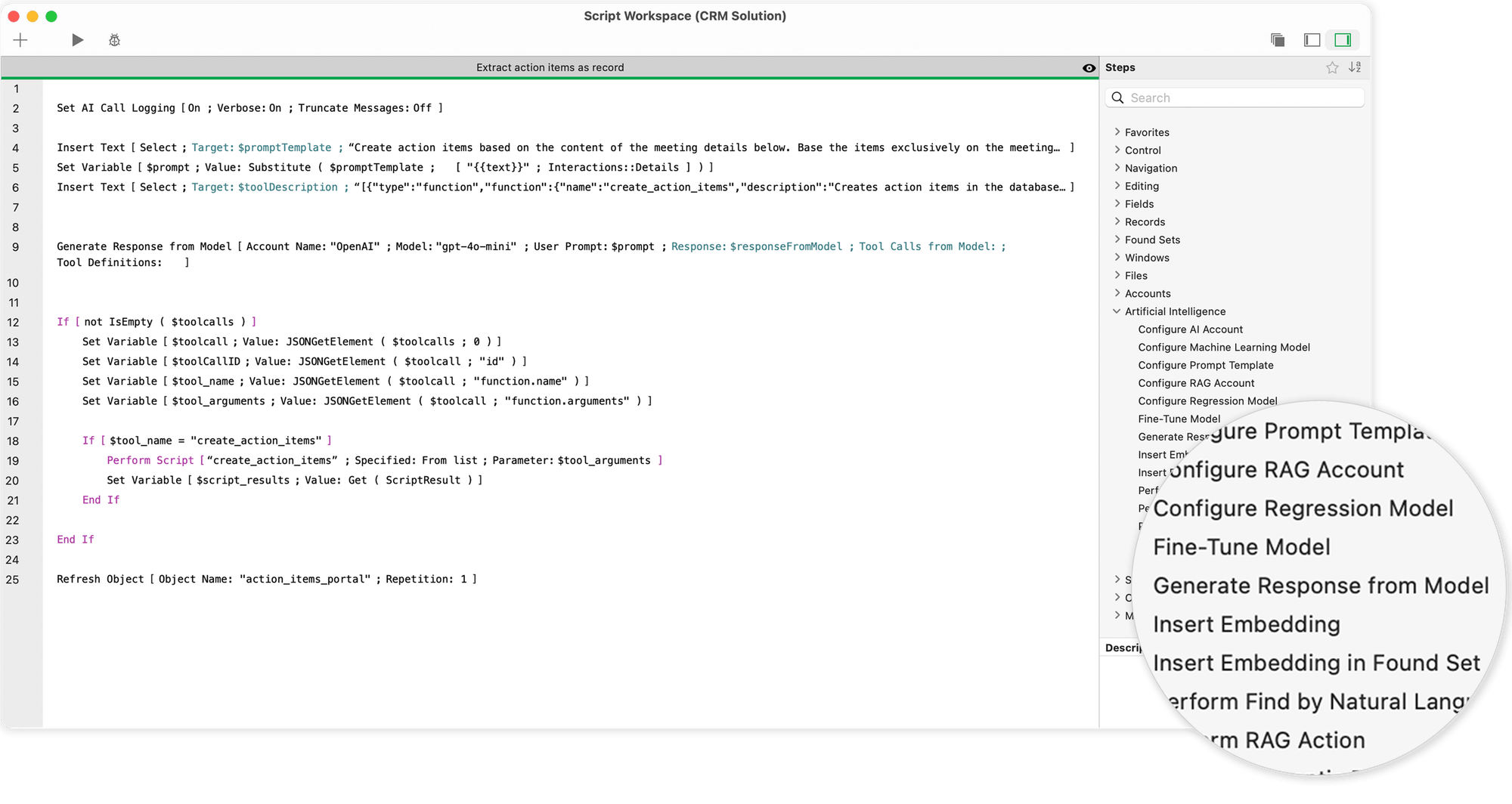
The most important commands include:
- "Generate Response from Model", which can be used to generate text responses - for example for automatic text suggestions, chat functions or e-mail drafts.
- "Perform Find by Natural Language"which translates a simple formulation ("Show me all customers from Berlin with open invoices") into a precise database query.
- "Perform SQL Query by Natural Language", which can also be used to generate and process complex SQL structures - including joins and subqueries.
- "Get Embedding" and related functions that enable semantic vector analyses - for example to search for texts with similar content or customer inquiries.
All these commands access the currently selected MLX model running on the AI Model Server in the background. The answers are immediately available and can be processed directly - as text, JSON or embedded vector.
Script steps and possibilities for AI in FileMaker
Script steps for artificial intelligence enable the direct integration of powerful AI models - such as Large Language Models (LLMs) or Core ML - into FileMaker workflows. They create the technical basis for combining natural language, database knowledge and machine learning. The following functions are available:
- Configuration of a named AI account
You can set up and name a specific AI account, which is then used in all further script steps and functions. This allows you to retain control over authentication and access to external models or services. - Retrieving a text response based on a prompt
An AI model can react to a prompt entered by the user and generate a corresponding text response. This enables automated text generation, suggestions or dialog functions. - Database query based on a prompt and the database schema
By passing a prompt in natural language together with the structural schema of your database, the model can identify relevant content and return a targeted result. - Generate SQL queries
The model can also generate SQL queries based on a prompt and the underlying database schema. This allows complex queries to be generated automatically, which can then be used for database operations. - FileMaker search queries based on layout fields
By passing the fields of the current layout to the model together with a natural language prompt, search queries can be formulated automatically and suitable result sets retrieved. - Insert embedding vectors into data records
You have the option of inserting semantic embeddings - i.e. numerical vectors that represent meanings - into fields of individual data records or entire result sets. This forms the basis for subsequent semantic comparisons or AI analyses. - Perform a semantic search
Based on the meaning of a search query, the system can identify data records whose field data have similar meanings - even if the words do not match exactly. This opens up new avenues for intelligent data searches. - Set up prompt templates
You can define reusable prompt templates that can be used in other script steps or functions. This ensures consistency and saves time when creating structured prompts. - Configure regression model
A regression model can be set up for tasks such as predictions, estimates or trend analyses, which then operates on numerical data sets. It is suitable for analyzing sales developments or risk assessments, for example. - Configure and manage your RAG account
A named RAG account (Retrieval Augmented Generation) can be set up. This allows you to add or remove data and send specific prompts to a RAG space. RAG systems combine classic searches with AI-generated answers. - Fine-tuning a model with training data
You can retrain an existing model with your own data set to better adapt it to specific requirements, language styles or task areas. Fine-tuning increases the relevance and quality of the output. - Log AI calls
The logging of all AI calls can be activated for tracking and analysis. This is helpful for optimizing prompts, troubleshooting or documentation - Configure Core ML models
In addition to cloud-based LLMs, locally executed Core ML models can also be configured. This is particularly useful for offline applications or for use on Apple devices with integrated ML support.
Current survey on the future of Claris FileMaker and AI
Fine-tuning directly from FileMaker: LoRA as the new standard
One of the most exciting new features is the ability to fine-tune your own models directly in FileMaker - completely within the familiar interface. All you need is a script command: „Fine-Tune Model“.
Here, data records from FileMaker tables (e.g. support histories, customer dialogs, text samples) can be used as training data. The fine-tuning method is based on LoRA (Low-Rank Adaptation), a resource-saving procedure that only changes a small part of the model parameters and thus enables quick adjustments - even on devices with limited RAM.
The training data is either taken from a current found set or imported via a JSONL file. After training, a new model name is assigned - e.g. „fm-mlx-support-v1“ - and the result is immediately available for further AI functions. This makes it possible to create customized language models that are precisely tailored to the respective application in terms of tone, vocabulary and behaviour.
Data protection and performance - two sides of the same coin
It is no coincidence that FileMaker 2025 relies on local models with MLX. At a time when data sovereignty, GDPR compliance and internal security guidelines are becoming increasingly important, this approach offers several advantages:
- No cloud, no external servers, no API costsAll requests remain in your own network.
- Faster response times thanks to local processing - especially for recurring processes.
- High transparency and controllabilityEvery answer can be checked, every change tracked, every training step documented.
- Fine-tuning to your own dataCompany-specific knowledge is no longer routed via external providers, but remains entirely within the company's own system.
At the same time, it is important to assess the resources realistically: Large models also require a solid infrastructure locally - such as a Apple Silicon Mac with 32 or 64 GB RAM, possibly with SSD caching and a dedicated server profile. But those who take this route will benefit in the long term from maximum control with full flexibility.
MLX and FileMaker - a new alliance for professionals
What initially looked like a parallel path - on the one hand MLX as the research framework of Apple, on the other hand FileMaker as the classic database platform - has now grown together into a closed system.
Claris has recognized that modern business applications need more than forms, tables and reports. They need adaptive, insightful AI - integrated, not bolt-on. With native support for MLX, the new AI commands and the option of local fine-tuning, FileMaker 2025 offers a complete platform for building, controlling and productively using your own AI processes for the first time - without having to rely on external providers or third-party clouds.
For developers like you who value a clear, conservatively thought-out and data-secure architecture, this is more than progress - it's the start of a new way of working.
In another article I present a Comparison between Apple Silicon and NVIDIA and explain which hardware is suitable for running local language models on a Mac.


Frequently asked questions
- What exactly does it mean that FileMaker 2025 "supports MLX"?
FileMaker Server 2025 contains an integrated AI Model Server for the first time, which - if installed on a Apple Silicon Mac install - uses MLX models natively. This means that you can deploy an MLX-compatible model (e.g. Mistral or Phi-2) directly via the Admin Console and use it in your FileMaker solution - without detours via external services or REST calls. - What specific hardware and software do I need for this?
- A Mac with Apple Silicon (M1, M2, M3, M4), ideally with 32-64 GB RAM,
- FileMaker Server 2025, on this Mac installiert,
- FileMaker Pro 2025 for the actual solution,
- and one or more MLX-compatible models - either provided by Claris or converted by yourself (e.g. via mlx-lm). - How do I integrate such a model into my FileMaker solution?
You can use the new „Configure AI Account“ function in FileMaker Scripts to specify which model is used. The server name, the model name and the auth key are defined. You can then immediately use the other AI functions - e.g. for text generation, embedding or semantic search. Everything runs via native script steps, no more web viewer or „Insert from URL“ tinkering required. - Which AI functions can I use in FileMaker?
The following functions are available (depending on the model type):
- Text generation ("Generate Response from Model")
- Natural search ("Perform Find by Natural Language")
- SQL in everyday language ("Perform SQL Query by Natural Language")
- Semantic vectors ("Get Embedding", "Cosine Similarity")
- Prompt template management ("Configure Prompt Template")
- LoRA fine-tuning via own data ("Fine-Tune Model")
All functions are script-step-based and can be seamlessly integrated into existing solutions. - How does fine-tuning work directly in FileMaker?
In FileMaker 2025, you can fine-tune an existing MLX model directly via LoRA - i.e. customize it with your own data. To do this, you either use data records in a table (e.g. questions + answers) or a JSONL file. A single script command („Fine-Tune Model“) is enough to create a new, customized model - which is then immediately available in the solution. - Do I still need to be familiar with Python, JSON, APIs or model formats?
No, not necessarily. Claris has deliberately made sure that many of these technical details fade into the background. You can work with native script commands, manage the data yourself in FileMaker and simply process the returns as text or vector. If you want, you can go deeper - but now you can do it without programming knowledge. - What are the advantages of using MLX via FileMaker compared to external APIs?
The advantages lie in data security, cost control and performance:
- No cloud connection necessary, all data remains in your own network.
- No API costs or token limits - once installiert, it is free to use.
- Very short response times, as there is no network latency in between.
- Full control over training data, fine-tuning and model versioning.
This is a real game changer, especially for internal applications, industry solutions or sensitive processes. - Are there any restrictions or things to watch out for?
Yes - MLX only works on Apple Silicon, i.e. an Intel server is excluded. You also need enough RAM for larger models to run reliably. Not all models are immediately compatible - some need to be converted. And finally: Although many things work „automatically“, you should always carry out a dedicated test run for productive use - e.g. with small amounts of data, clear target definitions and a good logging strategy.
Image material (c) Claris Inc. and Kohji Asakawa on Pixabay
