Anyone working with artificial intelligence today often first thinks of ChatGPT or similar online services. You type in a question, wait a few seconds - and receive an answer as if a very well-read, patient conversation partner were sitting at the other end of the line. But what is easily forgotten: Every input, every sentence, every word travels via the Internet to external servers. That's where the real work is done - on huge computers that you never get to see yourself.
In principle, a local language model works in exactly the same way - but without the Internet. The model is stored as a file on the user's own computer, is loaded into the working memory at startup and answers questions directly on the device. The technology behind it is the same: a neural network that understands language, generates texts and recognizes patterns. The only difference is that the entire calculation remains in-house. You could say: ChatGPT without the cloud.
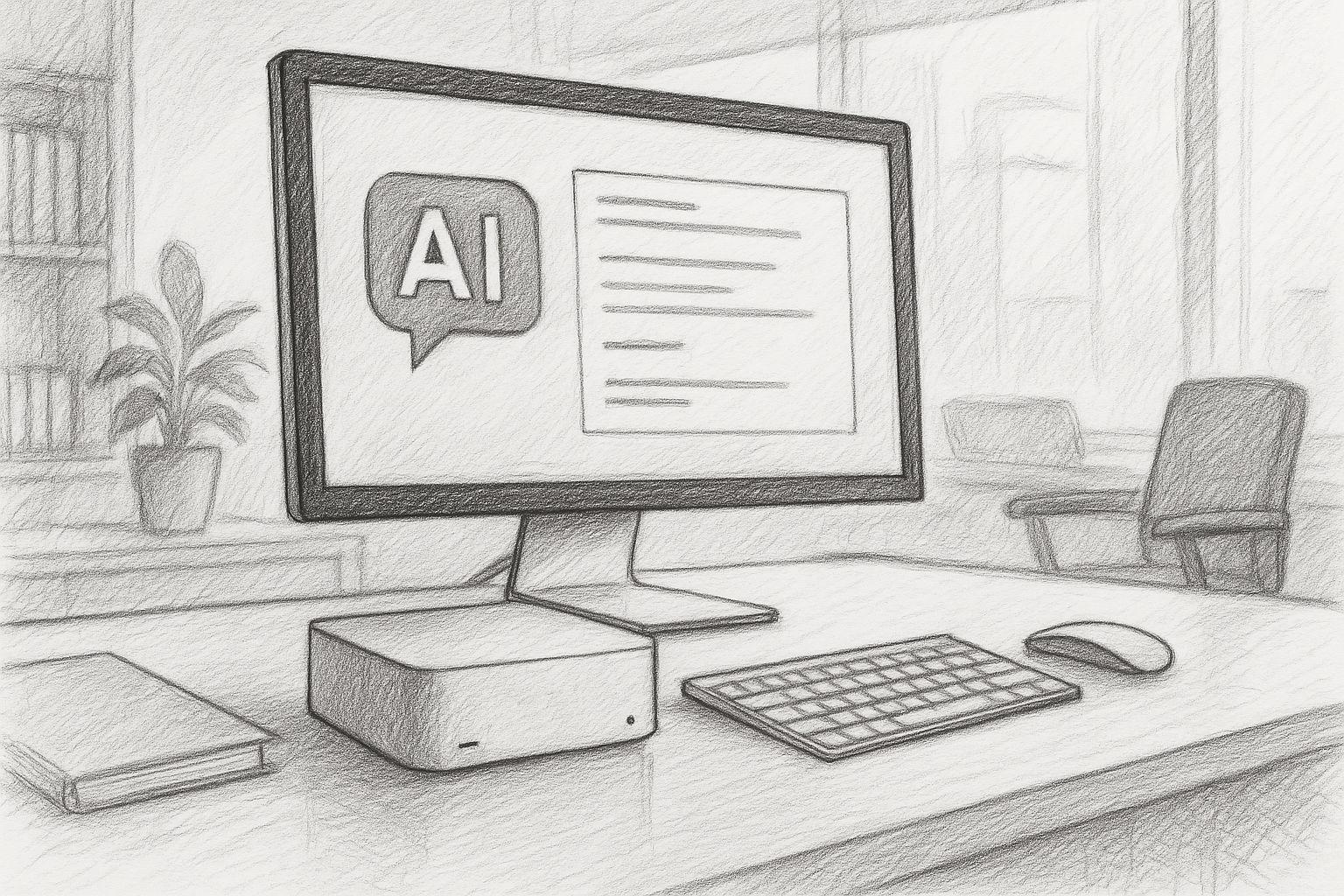
The special thing about it is that the technology has now developed to such an extent that it no longer relies on huge data centers. Modern Apple computers with M processors (such as M3 or M4) have enormous computing power, fast memory connections and a specialized neural engine for machine learning. As a result, many models can now be run directly on a Mac Mini or Mac Studio - without the need for a server farm, without complicated setup and without any significant noise.


Latest news about Apple MLX and NVIDIA
26.03.2026: Apple continues to strategically advance its MLX AI framework and is increasingly opening it up to other platforms. Originally optimized exclusively for Apple Silicon, MLX now also supports CUDA GPUs and therefore classic Nvidia hardware. This removes a key hurdle for developers: until now, models often had to be developed on the Mac and then trained on separate high-performance systems. By opening up, MLX becomes a more flexible development platform that enables both local AI on Apple devices and scalable training on external hardware. At the same time, the advantage of close integration with Apple's own architecture is retained, for example through efficient memory management and direct GPU utilization. The development points to a strategic change of course: Apple is gradually leaving its closed ecosystem and positioning MLX as a serious alternative to established AI frameworks - with potential implications for AI development as a whole.
This opens a new door, not only for developers, but also for entrepreneurs, authors, lawyers, doctors, teachers and tradespeople. Everyone can now have their own little AI - on their desk, under full control, ready for use at any time. A local language model can:
- Texts summarize or correct,
- Emails formulate or structure,
- Questions and evaluate knowledge,
- Processes support in programs,
- Documents search or classify,
- or simply as personal assistant without any data ever reaching the outside world.
Especially at a time when data protection and digital sovereignty are once again coming to the fore, this approach is gaining in importance. You don't have to be a programmer to use it - a modern Mac is all you need. The models can simply be started via an app or a terminal window and then respond almost as naturally as a chat window in the browser.
This article shows which models can be run on which Mac today, what the hardware needs to do and why Apple Silicon computers are particularly suitable for this. In short, it's about how to take the power of AI back into your own hands - quietly, efficiently and locally.
Local language models on the Mac - Why this makes sense now
Running a language model "locally" means that it is operated entirely on your own computer - without a connection to a cloud service. The calculation, the analysis of inputs, the generation of texts or answers - everything happens directly on your own device. The model is therefore stored as a file on the SSD, is loaded into the working memory at startup and works there with the full performance of the system.
The key difference to the cloud variant is independence. No data flows over the internet, no external servers are used and nobody can see what is being processed internally. This provides a considerable degree of data protection and control - especially in times when data movements are becoming increasingly difficult to trace.
In the past, running such models locally was unthinkable. A mainframe computer or GPU farm was needed to keep a neural network of this size running at all. Today, with the computing power of modern Apple-Silicon chips, this can be implemented on a desktop device - efficiently, quietly and with low power consumption.
Why Apple Silicon is ideal
With the switch to Apple Silicon, Apple has reshuffled the cards. Instead of classic Intel architecture with separate CPU and GPU, Apple relies on a so-called unified memory design: processor, graphics and neural engine access the same fast main memory. This eliminates the need for data copies between individual components - a decisive advantage for AI calculations.
The neural engine itself is a specialized computing core for machine learning that is integrated directly into the chips. It enables billions of computing operations per second - with very low energy consumption. Together with the MLX library (Machine Learning for Apple Silicon) and modern frameworks such as OLaMA, models can now run directly on macOS without complex GPU drivers or CUDA dependencies.
An M4 chip in the Mac Mini is enough to run compact language models (e.g., 3–7 billion parameters) smoothly. On a Mac Studio with an M4 Max or M3 Ultra, you can even run models with 30 billion parameters—entirely locally.
Comparison: Apple Silicon vs. NVIDIA hardware
Traditionally, NVIDIA's RTX graphics cards have been the gold standard for AI calculations. A current RTX 5090, for example, offers enormous raw performance and is still the first choice for many training systems. Nevertheless, a detailed comparison is worthwhile - because the priorities differ.
| Aspect | Apple Silicon (M4 / M4 Max / M3 Ultra) | NVIDIA GPU (5090 & Co.) |
|---|---|---|
| Energy consumption | Very efficient - usually less than 100 W total consumption | Up to 450 W for the GPU alone |
| Noise development | Virtually silent | Clearly audible under load |
| Software stack | MLX / Core ML / Metal | CUDA / cuDNN / PyTorch |
| Maintenance | Driverless and stable | Frequent updates and compatibility issues |
| Price-performance | High efficiency at a moderate price | Better peak performance, but more expensive |
| Ideal for | Local inference and continuous operation | Training and large models |
In short, NVIDIA is the choice for data centers and extreme training. Apple Silicon, on the other hand, is ideal for local, long-term use - without noise, without heat build-up, with a stable software basis and manageable power consumption.
Apple Silicon in comparison with NVIDIA for inference
The M3 Ultra marks a significant step forward for Apple Silicon: In addition to a highly integrated chip design with CPU, GPU and Neural Engine in one package, it relies on a unified memory architecture in which RAM is used by all computing units simultaneously - without the classic separation of RAM and GPU VRAM. According to benchmarks, this approach already achieves comparable or even better performance in local inference tasks than high-end graphics cards from NVIDIA in some cases. One example: In the test, the M3 Ultra was at approx. 2,320 tokens/s with a Qwen3-30B 4bit model compared to the RTX 3090 at 2,157 tokens/s.
Additionally, a comparison of Apple Silicon vs NVIDIA at AI loads suggests that an M3/M4 Max system will achieve between around 40-80W consumption under load, while an RTX 4090 will typically draw up to 450W.
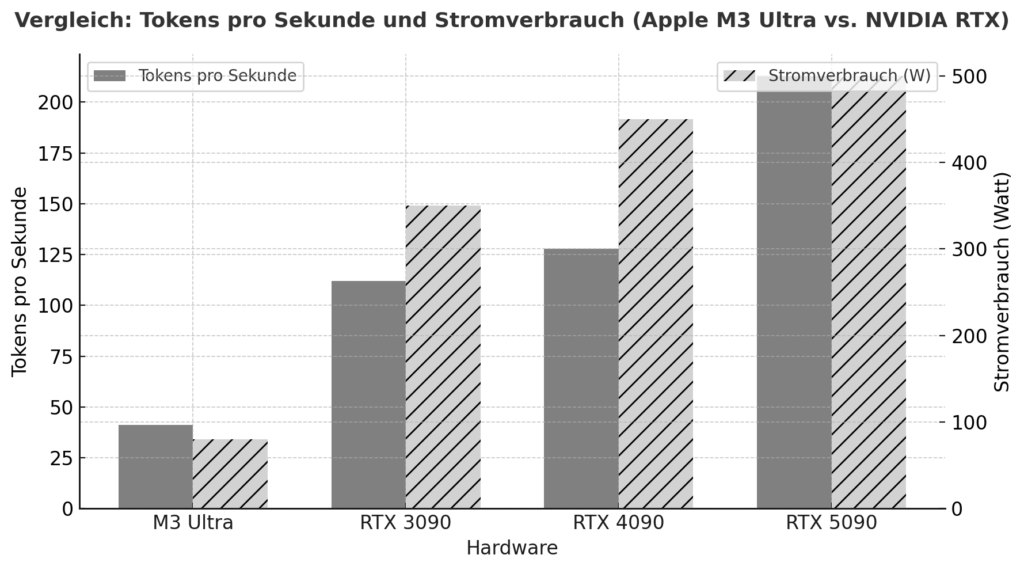
This shows that if you look not only at peak performance, but also at efficiency per watt, Apple Silicon is in an excellent position. On the other hand, there are the NVIDIA cards (e.g. 3090, 4090, 5090) with their enormous parallelized GPU architecture, very high CUDA/tensor core density and specialized libraries (CUDA, cuDNN, TensorRT). This is where raw top-flops performance is often ahead - but with decisive limitations for local language models: the available VRAM (e.g. 24-32 GB for gaming cards) quickly becomes a bottleneck if models with 20-30 billion parameters or more are to be loaded. One user report, for example, states that with an RTX 5090 with approx. 32 GB of VRAM, a model with 20-22 billion parameters is already difficult to accommodate.
In this respect, you should not only look at GPU cores, but also at the available memory size, bandwidth and memory architecture. The M3 Ultra with up to 512 GB of unified memory (in the top configurations), for example, offers advantages in many local deployment scenarios - especially if models are not to run in the cloud, but permanently locally.
| Hardware | Model / Setup | Tokens per second (approximate) | Remark |
|---|---|---|---|
| Apple M3 Ultra (Mac Studio) | z. e.g. Gemma-3-27B-Q4 on M3 Ultra | ≈ 41 tok/s :contentReference[oaicite:2]{index=2} | LLM Inference, context 4k tokens, quantized |
| NVIDIA RTX 5090 | 8 B Model (Quantized) according to study | ≈ 213 tok/s :contentReference[oaicite:3]{index=3} | 8 B model, 4-bit, RLHF environment |
| NVIDIA RTX 4090 | 8 B Model reference | ≈ 128 tok/s :contentReference[oaicite:4]{index=4} | 24 GB VRAM Environment |
| NVIDIA RTX 3090 | Budget high-end in comparison | ≈ 112 tok/s :contentReference[oaicite:5]{index=5} | Second-hand market, 24 GB VRAM |
Practical relevance: Where local language models make sense
The possible applications of local AI are almost unlimited today. Whenever data needs to remain confidential or processes need to run in real time, the local variant is worthwhile. Examples from practice:
- ERP systemsAutomatic text analysis, suggestions, forecasts or communication aids - directly from the software.
- Book and media productionStyle check, translation, summary, text expansion - all locally, without cloud dependency.
- Lawyers and notariesDocument analysis, draft pleadings, research - under the strictest confidentiality.
- Doctors and therapistsCase evaluation, documentation or automated reports - without patient data ever leaving the system.
- Engineering firms and architectsText, project and calculation wizards that also work without the Internet.
- Company in generalKnowledge management, internal chat assistants, protocol evaluation, e-mail classification - all within your own network.
This is a big step, especially in the commercial sector: instead of paying for external AI services and sending data to the cloud, you can now run customized models on your own machines. These can be adapted, fine-tuned and expanded with the company's own knowledge - completely under control.
The result is a modern but traditionally sovereign IT landscape that uses technology without relinquishing control over its own data. An approach that reminds us of old virtues: keeping things in our own hands.
On-Premises AI in the Enterprise: First Determine Your Needs, Then Choose the Hardware
 A Mac Studio with plenty of unified memory or a high-performance NVIDIA workstation may be technically fascinating—but for a company, another question is crucial at first: What specific problem is the AI supposed to solve? Only then can you determine what data is needed, what model size makes sense, and whether you should even purchase your own AI hardware. For confidential company data, internal knowledge management, or integration with ERP and database systems, on-premises AI can offer significant advantages. For other tasks, a cloud-based model may be more powerful and cost-effective.
In my AI Consulting for Small and Medium-Sized Businesses Therefore, the process does not begin with the sale of a specific technology, but rather with an assessment of data, processes, and potential applications. This leads to prioritized use cases and a well-reasoned recommendation for on-premises AI, the cloud, or a hybrid approach. This means that hardware isn’t purchased first and then a use case is sought—rather, the technology is tailored to actual operational needs.
Current survey on local AI systems
Overview: Mac Mini and Mac Studio - what's currently available
If we want to run local language models on a Mac today, then two desktop classes are particularly in focus: the Mac mini and the Mac Studio.
- Mac MiniThe latest generation offers the Apple M4 chip or optionally the M4 Pro. According to the technical specifications, variants with 24 GB or 32 GB unified memory are available; the Pro variant is offered with configurable unified memory of up to 48 GB or 64 GB. This makes the Mac Mini well suited for many applications - especially if the model is not extremely large or does not have to run several very large tasks in parallel.
- Mac Studio: This takes things up a notch. Equipped, for example, with the Apple M4 Max chip or the M3 Ultra chip—depending on the model. The M4 Max version supports 48 GB, 64 GB, or up to 128 GB of unified memory. The M3 Ultra version of the Mac Studio can be equipped with up to 512 GB of unified memory. SSD capacities and memory bandwidths also increase significantly. This makes the Mac Studio for more advanced models or parallel processes.
As a short note: The Mac Pro also exists and often offers „more chassis“ or PCI-e slots on the outside - but in terms of language models, it doesn't offer much of an advantage over the Mac Studio for the local version if you don't have any additional expansion cards or special PCIe requirements.
Also Notebooks (e.g. MacBook Pro) can certainly be used - but with restrictions: The cooling systems are smaller, thermal performance is more limited and the RAM budget is often lower. Long-term utilization (as with AI models) can reduce performance.

AI: Apple better than Nvidia! 😮 | c’t 3003
Why RAM / unified memory is so important
When a language model runs locally, it is not only the CPU or GPU performance that is needed - the working memory (RAM or, in the case of Apple: "unified memory") is crucial. Why?
The model itself (weights, activations, intermediate results) must be kept in memory. The larger the model, the more memory is required. Apple-Silicon chips use "unified memory", i.e. CPU, GPU and neural engine access the same memory pool. This eliminates the need for data copies between components, which increases efficiency and speed.
If there is not enough RAM, the system has to swap out or models are not fully loaded - which can mean a drop in performance, instability or termination. Especially with inferential applications (response generation, text input, model extension), response time and throughput are crucial - sufficient memory helps considerably here. A traditional desktop PC used to think in terms of "CPU RAM" and "separate GPU RAM" - with Apple Silicon it is elegantly combined, which makes running language models particularly attractive.
Estimated values: What order of magnitude is realistic?
To help you estimate what hardware you will need, here are a few rough guide values:
- For smaller models (e.g. a few billion parameters), 16 GB to 32 GB RAM could be sufficient - especially if only individual queries are to be processed. A Mac Mini with 16/32 GB would therefore be a good start.
- For medium models (e.g. 3-10 billion parameters) or tasks with several parallel chats or large amounts of text, you should consider 32 GB RAM or more - e.g. Mac Studio with 32 or 48 GB.
- For large models (>20 billion parameters) or if several models are to run in parallel, you could choose 64 GB or more - Mac mini and Mac Studio variants with 64 GB or higher are possible here.
Important: Remember to allow for some buffer - not only the model, but also the operation (e.g. the operating system, file I/O, other applications) requires memory reserves.
| Category | Typical model size | Recommended RAM budget | Example of use |
|---|---|---|---|
| Small | 1-3 billion parameters | 16-32 GB | Simple assistant, text recognition |
| Medium | 7-13 billion Parameters | 32-64 GB | Chat, analysis, text creation |
| Large | 30-70 billion Parameters | 64 GB + | Technical texts, legal documents |
Questioning the traditional "server vs. desktop" mindset
Traditionally, people thought that AI required server farms, lots of GPUs, lots of power and a data center. But the picture is changing: desktop computers such as Mac Mini or Mac Studio now offer sufficient performance for many locally operated language models - without a huge infrastructure. Instead of high electricity costs, heavy cooling and costly maintenance, you get a quiet, effective device on your desk.
Of course, if you want to train models on a large scale or use a large number of parameters, server solutions still make sense. However, desktop hardware is often sufficient for inference, adaptation and everyday use. This is associated with a traditional attitude: use technology, but don't oversize it - rather use it in a targeted and efficient manner. If you build a solid local basis today, you create the foundation for what will be possible tomorrow.

M3 Ultra vs RTX 5090 | The Final Battle (English)
Technical characterization of language models
Today, language models differ not only in their capabilities, but also in the technical format in which they are available. These formats determine how the model is saved, loaded and used - and whether it can run on a particular system at all.
GGUF (GPT-Generated Unified Format)
This format was developed for practical use in tools such as Ollama, LM Studio, or Llama.cpp. It is compact, portable, and highly optimized for on-device inference. GGUF models are usually quantized, which means they consume significantly less memory because the internal numerical values are stored in a reduced format (e.g., 4-bit or 8-bit). As a result, models that were originally 30–50 GB in size can be compressed to 5–10 GB—with only a slight loss of quality.
- AdvantageRuns on almost any system (macOS, Windows, Linux), no special GPU required.
- DisadvantageNot intended for training or fine-tuning - pure inference (i.e. use).
MLX (Machine Learning for Apple Silicon)
MLX is Apple's own open source framework for machine learning on Apple Silicon. It is specifically designed to utilize the full power of CPU, GPU and Neural Engine in M-Chips. MLX models are usually in native MLX format or converted from other formats.
- AdvantageMaximum performance and energy efficiency on Apple hardware.
- DisadvantageStill relatively young ecosystem, fewer community models available than with GGUF or PyTorch.
Safetensors (.safetensors)
This format originates from the PyTorch world (and is strongly promoted by Hugging Face). It is a safe, binary storage format for large models that does not allow code execution - hence the name "safe".
- AdvantageVery fast loading, memory-saving, standardized.
- DisadvantageMainly intended for frameworks such as PyTorch or TensorFlow - i.e. more common in developer environments and for training processes.
| Format | Platform | Purpose | Advantages | Disadvantages |
|---|---|---|---|---|
| GGUF | macOS, Windows, Linux | Inference | Compact, fast, universal | No training possible |
| MLX | macOS (Apple Silicon) | Inference + Training | Optimized for M-Chips, high efficiency | Fewer models available |
| Safetensors | Cross-platform (PyTorch / TensorFlow) | Training & Research | Secure, standardized, fast | Not directly compatible with Ollama / MLX |
Hugging Face - the central source of supply
Today, Hugging Face is something like the "library" of the AI world. On huggingface.co you will find tens of thousands of models, data sets and tools - many of which are free to use. You can filter by name, architecture, license type or file format. Whether Mistral, LLaMA, Falcon, Gemma or Phi-3 - almost all well-known models are represented there. Numerous developers already offer customized versions for local use with GGUF or MLX.
This makes Hugging Face the first port of call for most users when they want to try out a model or find a suitable variant for macOS.

Typical models and their areas of application
The number of models available is now almost impossible to keep track of. Nevertheless, there are a few main families that have proved particularly successful for local use:
- LLaMA family (Meta): One of the best-known open source models. It forms the basis for countless derivatives (e.g. Vicuna, WizardLM, Open-Hermes). Strengths: Language comprehension, dialog, versatile use. Area of application: General chat applications, content generation, assistance systems.
- Mistral & Mixtral (Mistral AI)Known for high efficiency and good quality with a small model size. Mixtral 8x7B combines several expert models (Mixture-of-Experts architecture). Strengths: Fast, precise answers, resource-saving. Field of application: In-house assistants, text analysis, data preparation.
- Phi-3 (Microsoft Research)Compact model, optimized for high voice quality despite a low number of parameters. Strengths: Efficiency, good grammar, structured responses. Area of application: Smaller systems, local knowledge models, integrated assistants.
- Gemma (Google): Published by Google Research as an open model. Good for summary and explanatory tasks. Strengths: Coherence, contextual explanations. Area of application: knowledge processing, training, advisory systems.
- GPT-OSS / OpenHermes modelsTogether with LLaMA modifications, they form the "bridge" between open source models and the functional scope of commercial systems. Strengths: Broad language base, flexible use. Area of application: Content creation, chat and analysis tasks, internal AI assistance.
- Claude / Command R / Falcon / Yi / ZephyrThese and many other models (mostly from research projects or open communities) offer special functions such as knowledge retrieval, code generation or multilingualism.
The most important point is that no model can do everything perfectly. Each has its strengths and weaknesses - and depending on the application, it is worth making a targeted comparison.
Which model is suitable for what?
To get a realistic assessment, the models can be roughly divided into performance and application classes:
For most realistic desktop applications - such as summaries, correspondence, translation, analysis - medium models (7-13 B) are completely sufficient. They deliver amazingly good results, run smoothly on a Mac Mini M4 Pro with 32-48 GB RAM and require hardly any readjustment.
Large models show their strengths when a deeper understanding or longer contexts are important - for example when processing legal texts or technical documentation. However, you should have at least one Mac Studio with 64-128 GB Use working memory.
| Model family | Origin | Strengths | Field of application |
|---|---|---|---|
| LLaMA | Meta | Language comprehension, dialog | General chat applications |
| Mistral / Mixtral | Mistral AI | Efficiency, high precision | Company assistants, analysis |
| Phi-3 | Microsoft Research | Compact, linguistically strong | Small systems, local AI |
| Gemma | Google Research | Coherence, explainability | Consulting, teaching, text explanation |
Options for operating language models locally
If you want to use a language model on your own Mac today, there are several practicable options - depending on your technical requirements and desired purpose. The great thing is that you no longer need a complex development environment to get started.
Ollama - the uncomplicated start
Ollama has quickly become a standard tool for local AI models. It runs natively on macOS, makes optimum use of the performance of Apple Silicon and allows a model to be started with a single command:
ollama run mistral
This automatically loads and prepares the desired model, which is then available in the terminal or via local interfaces. Ollama supports the GGUF format, allows model downloads from Hugging Face and can be integrated via REST APIs or directly into other programs.
How to work with Ollama a local language model installiert and what other options you have with it are described in detail in another article. There are also further articles on how to use Qdrant a flexible memory for its local AI.
LM Studio - graphical user interface and administration
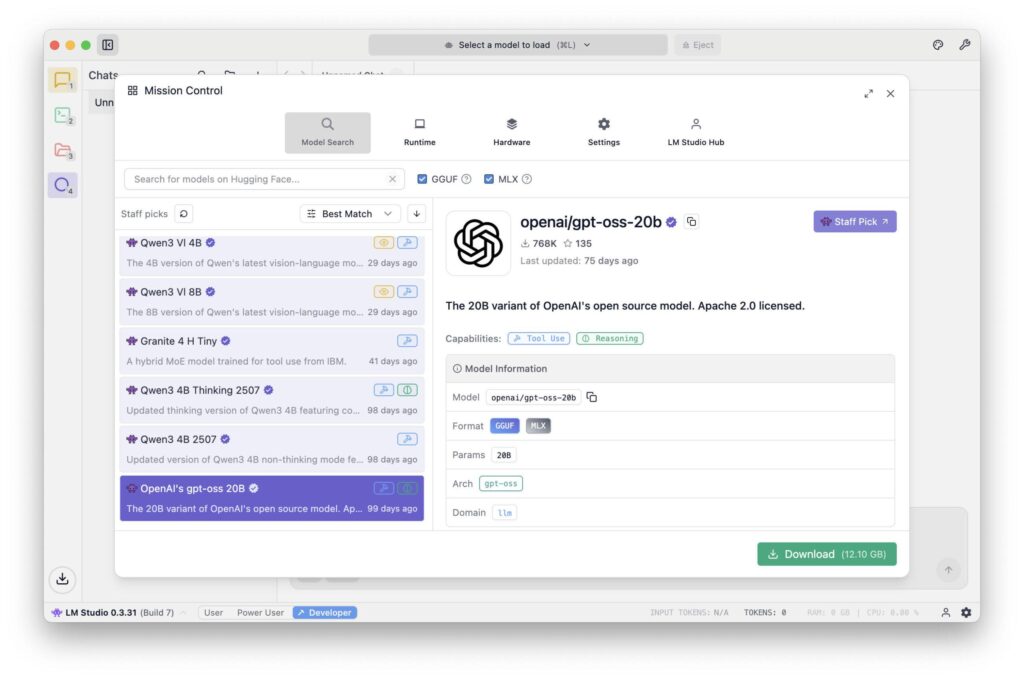
LM Studio is aimed at anyone who prefers a graphical user interface. It offers model downloads, chat windows, temperature controls, system prompts and memory management in one app. This is ideal for beginners in particular: you can try out, compare, save and switch between different models without having to work with the command line. The software runs stably on Apple Silicon and also supports GGUF models.
MLX / Python - for developers and integrators
If you want to go deeper or integrate models into your own programs, you can use Apple's MLX framework. This allows models to be embedded directly in Python or Swift applications. The advantage lies in maximum control and integration into existing workflows - for example, if a company wants to add AI functions to its own software.
FileMaker Server 2025 - AI in the corporate context
Since FileMaker Server 2025 MLX-based language models can also be addressed on the server side. This makes it possible for the first time to equip a central business application (e.g. ERP or CRM system) with its own local AI. For example, support tickets can be automatically classified, customer inquiries evaluated or content in documents analyzed - without data leaving the company.
This is particularly interesting for sectors that have strict data protection or compliance requirements (medicine, law, administration, industry).
Typical stumbling blocks and how to avoid them
Even if the entry hurdle is low, there are a few points you should be aware of:
Memory limits: If the model is too large for the available memory, it will not start at all or will be extremely slow. Quantization (e.g. 4-bit) or a smaller model can help here.
- Computing load and heat development: The Mac can become noticeably warm during longer sessions. Good ventilation and keeping an eye on the activity display are advisable.
- Lack of GPU support for third-party softwareSome older tools or ports do not use the Neural Engine efficiently. In such cases, MLX can deliver better results.
- Network ports and rightsIf several clients are to access the same model (e.g. within a company network), local ports must be released - preferably secured via HTTPS or via an internal proxy.
- Data securityEven if the models run locally, sensitive texts should not be stored in insecure environments. Local logs and chat logs are easy to forget, but often contain valuable information.
If you pay attention to these points, you can operate a powerful, local AI system that runs securely, quietly and efficiently with surprisingly little effort.
Timeline & strategic considerations
We are only at the beginning of a development that will change the everyday life of many professions over the next few years. Local AI models are becoming increasingly smaller, faster and more efficient, while their quality continues to improve. What still requires 30 GB of memory today may only require 10 GB in a year's time - with the same voice quality. At the same time, new interfaces are emerging that can be used to integrate models directly into Office programs, browsers or company software.
Companies that take the step towards a local AI infrastructure today are creating a head start for themselves. They build up expertise, secure their data sovereignty and make themselves independent of price fluctuations or usage restrictions imposed by external providers. A sensible strategy could look like this:
- First experiment with a small model (e.g. 3-7 billion parameters, via Ollama or LM Studio).
- Then specifically check which tasks can be automated.
- If necessary, integrate larger models or set up a central Mac Studio as an "AI server".
- In the medium term, redesign internal processes (e.g. documentation, text analysis, communication) with AI support.
This step-by-step approach is not only economically sensible, but also sustainable - it follows the principle of adopting technology at your own pace instead of being driven by trends.
In a separate article, I have described in detail how the newer MLX format compared with GGUF via Ollama on the Mac.
Local AI as a quiet path to digital sovereignty
Local language models mark a return to self-determination in the digital world.
Instead of sending data and ideas to remote cloud data centers, you can now work with your own tools again - directly on your desk, under your own control.
Whether on a Mac Mini, a Mac Studio or a powerful notebook - if you have the right hardware, you can now use, train and further develop your own AI. Whether as a personal assistant, as part of an ERP system, as a research aid in a publishing house or as a data protection-compliant solution in a law firm - the possibilities are astonishingly broad.
And the best thing about it: it reminds us of the old strength of the computer - namely being a tool that you control yourself, rather than a service that dictates how we should work. This makes local AI a symbol of modern autonomy - quiet, efficient and yet with an impressive effect.
Local AI in the company unfolds its value with the right system basis
 The discussion about local AI often revolves around hardware, models and speed - but the actual benefits only become apparent when it interacts with your own data and processes. If you really want to use AI sensibly, you need a stable, controlled environment in which information is not scattered but available in a structured way. This is precisely where a locally operated ERP solution It forms the backbone for data, processes and correlations within the company. In combination with a solution such as gFM Business ERP, this creates a closed loop in which local AI not only provides answers, but also works contextually - for example by integrating its own knowledge graph. Decisions are then no longer based on general models, but on actual company data. The result is a quiet but effective step towards true digital sovereignty: more control, more efficiency and a system that adapts to the company - not the other way around.
Recommended sources
- Profiling Large Language Model Inference on Apple Silicon: A Quantization Perspective (Benazir & Lin et al., 2025) – Provides a detailed analysis of inference performance on Apple and Silicon compared to NVIDIA GPUs, with a specific focus on quantization.
- Production-Grade Local LLM Inference on Apple Silicon: A Comparative Study of MLX, MLC‑LLM, Ollama, llama.cpp, and PyTorch MPS (Rajesh et al., 2025) – Comparison of various platforms on Apple and Silicon, including MLX, in terms of throughput, latency, and context length.
- Benchmarking On-Device Machine Learning on Apple Silicon with MLX (Ajayi & Odunayo, 2025) – Focuses on MLX and Apple, Silicon, with benchmark data compared to NVIDIA systems.



Frequently asked questions
- What exactly is a local language model?
A local language model is an AI that can understand and generate texts - similar to ChatGPT. The difference is that it does not run over the Internet, but directly on your own computer. All calculations take place locally and no data is sent to external servers. This means that you retain full control over your own information. - What advantages does a local AI offer over a cloud solution like ChatGPT?
The three biggest advantages are data protection, independence and cost control.
- Data protection: No texts leave the computer.
- Independence: No Internet connection required, no change of provider or risk of failure.
- Costs: No ongoing fees per request. You pay once for the hardware - that's it. - Do you need programming skills to use a language model locally?
No. With modern tools such as Ollama or LM Studio, a model can be started with just a few clicks. Today, even beginners can run a local AI in just a few minutes without writing a single line of code. - Which Apple devices are particularly suitable?
For beginners, a Mac Mini with M4 or M4 Pro and at least 32 GB RAM is often sufficient. If you want to use larger models or several at the same time, it is better to go for a Mac Studio with 64 GB or 128 GB RAM. A Mac Pro offers hardly any advantages unless you need PCI-e slots. Notebooks are suitable, but reach their thermal limits more quickly. - What is the minimum amount of RAM you should have?
This depends on the model size.
– Small models (1–3 billion parameters): 16–32 GB is sufficient.
– Mid-range models (7–13 billion): preferably 48–64 GB.
- Large models (30 billion+): 128 GB or more.
It is important to plan some reserve - otherwise there will be waiting times or abortions. - What does "Unified Memory" mean for Apple Silicon?
Unified memory is a shared memory that the CPU, GPU and neural engine access simultaneously. This saves time and energy, as there is no need to copy data between different memory areas. This is a huge advantage, especially for AI calculations, because everything works in one flow. - What is the difference between GGUF, MLX and Safetensors?
- GGUF: A compact format for local use (e.g. in Ollama or LM Studio). Ideal for inference, i.e. the execution of finished models.
- MLX: Apple's own format, especially for M chips. Very efficient, but still young.
- Safetensors: A format from the PyTorch world, primarily intended for training and research.
GGUF or MLX are ideal for local use on the Mac. - Where do you get the models from?
The best-known platform is huggingface.co - a huge library for AI models. There you can find variants of LLaMA, Mistral, Gemma, Phi-3 and many others. Many models are already available in GGUF format and can be loaded directly into Ollama. - Which tools are easiest to get started with?
For starters, Ollama and LM Studio are ideal. Ollama runs in the terminal and is lightweight. LM Studio offers a graphical user interface with a chat window. Both load and start models automatically and require no complicated setup. - Can language models also be used with FileMaker Server?
Yes—since FileMaker Server 2025 MLX models can be accessed directly. This enables, for example, text analysis, classification, or automated evaluations within ERP or CRM systems. This allows confidential business data to be processed locally without sending it to external providers. - How big are such models typically?
Small models are just a few gigabytes, large ones can have 20 - 30 GB or more. Quantization (e.g. 4-bit) allows them to be greatly reduced in size, often with minimal loss of quality. A compressed 13-B model, for example, can only occupy 7 GB - perfect for a Mac Mini M4 Pro. - Is it possible to train or adapt local models?
Basically yes - but the training is very computationally intensive. MLX or Python frameworks can be used for local fine-tuning of smaller models. Today, FileMaker contains an integrated function to Directly fine-tune language models to be able to. For large-scale training (e.g. 50 billion parameters), however, a dedicated GPU farm would be necessary. For most applications, it is sufficient to use existing models and control them specifically via prompts. - How much power does a Mac consume during AI calculations?
Surprisingly little. A Mac Studio is often under 100 W in full operation, while a single NVIDIA graphics card (e.g. RTX 5090) draws up to 450 W - without CPU and peripherals. This means that local AI on Apple hardware is not only quieter, but also significantly more energy-efficient. - Is a MacBook Pro suitable for local AI?
Yes, but with restrictions.
Although the performance is high, the thermal load capacity is limited. The processor throttles during longer sessions. A MacBook Pro M3/M4 is perfect for short chats, text tasks or analyses - but not for long-term use. - How safe are local models really?
As secure as the system on which they run. As no data is sent over the internet, there is practically no risk from third parties. However, you should make sure that temporary files, logs or chat histories do not accidentally end up in cloud folders (e.g. iCloud Drive). Local storage on the internal SSD is ideal. - What are typical mistakes that beginners make?
- Loading models that are too large, even though there is not enough RAM.
- Use old versions of Ollama or LM Studio.
- Do not activate GPU acceleration (e.g. MLX).
- Too many processes running in the background.
- Loading models from questionable sources.
Remedy: Only use trustworthy sources (e.g. Hugging Face) and keep an eye on system resources. - How will local AI technology develop over the next few years?
The models are becoming even more compact and precise. Apple, Mistral and Meta are already working on architectures that require less memory and power for the same quality. At the same time, convenient interfaces are being developed - such as AI plug-ins for word processing, mail programs or note apps. In the long term, every professional system is likely to have a kind of "built-in local AI". - Why is it worth starting now?
Because the foundations for the coming years are being laid right now. Anyone who learns today to start a model locally, process data in a structured way and formulate prompts in a targeted manner will be able to act independently later on - without having to rely on expensive cloud providers. In short: local AI is the calm, confident path to a digital future in which you can once again keep your data and tools in your own hands.