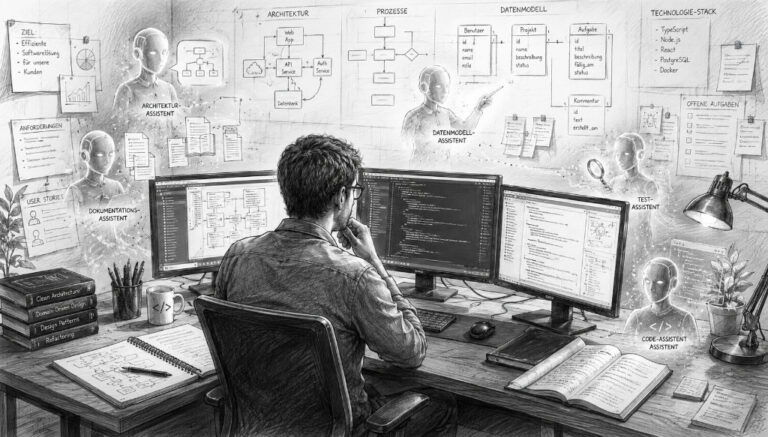
When developing a business application, the focus is initially on the visible tasks. Tables are created, relationships are defined, input forms are designed, and business processes are automated. As soon as the first users are able to work with the solution, a large part of the project appears to be complete. In practice, however, this is when the more challenging long-term phase begins. A business application must be maintained, expanded, and adapted to new requirements. Changes must be documented, new versions deployed, and existing data securely migrated. Added to this are different user permissions, data backups, error analysis, and the question of whether a solution should be operated locally, on a dedicated server, or in the cloud.
Many development platforms focus primarily on building the actual application. Additional tools and custom processes are added later for updates, documentation, deployment, and operations. Over time, this results in a technical environment consisting of many separate components that can only be kept together with considerable effort. SchallOS therefore takes a more comprehensive approach. The platform is designed to support a business application not only during its creation but throughout its entire lifecycle: from development through documentation and deployment to updates and ongoing operation.



Latest News About SchallOS Studio
12.08.2026: Development of SchallOS continues to move forward. In the meantime, the AI and Knowledge Layer The platform has been largely completed and deeply integrated into the development environment. SchallOS thus features a self-learning knowledge layer that incorporates experience gained from practical development and can adapt over time to the programming style and preferred solutions of each developer.
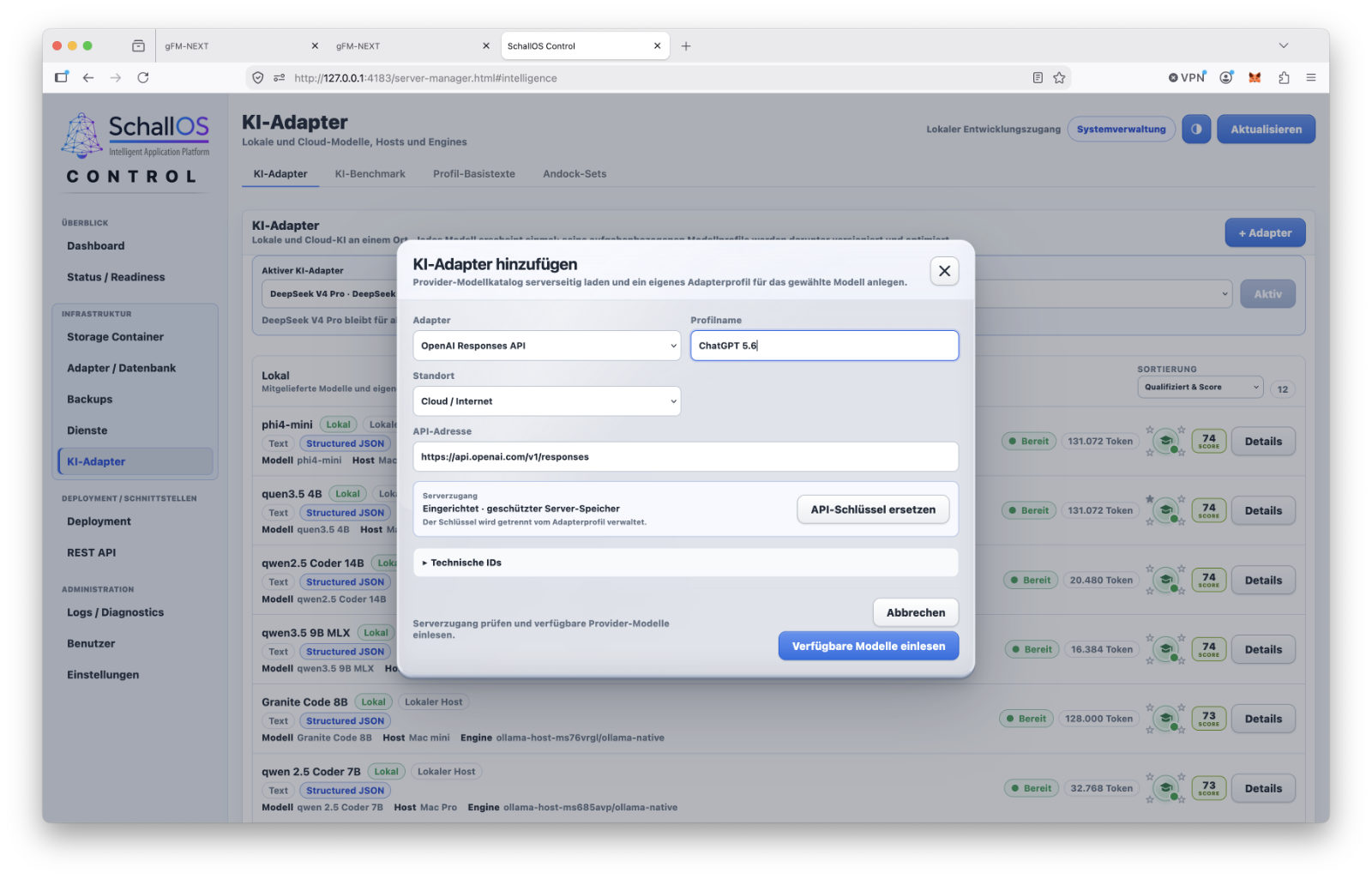
An open adapter system allows you to connect any Local and cloud-based AI models integrate. For a provider or model, multiple access credentials or API keys can be stored. Multiple models can be used in parallel and selected for different tasks based on their capabilities, speed, and past results. The model is selected automatically by the integrated Composer—the developer does not need to worry during development about which model is suitable for which task. Already known and proven solutions can be reused from the knowledge layer, so that not every task has to be processed from scratch by an AI model.
Available directly in SchallOS Studio specialized AI agents for various development tasks. These include a Formula Agent for calculations and formulas, a Function Container Agent for programming function containers, as well as a Layout Agent for working on user interfaces. Function containers can also be edited directly through their layout objects and programmed using AI. A parent System Agent can coordinate the specialized agents, for example, when entirely new modules or more extensive features are to be developed.
The AI layer is supplemented by the Adapter Studio in SchallOS Control. This allows developers to create their own network and data adapters, for example, to connect to external ERP systems, databases, or enterprise platforms such as SAP and Oracle. The necessary knowledge, model profiles, and solution-specific experience are managed and versioned within the knowledge architecture. SchallOS is thus increasingly evolving from a traditional development environment into a platform where developers, the knowledge layer, and various AI models work together on a software solution.
Knowledge layer for users and corporate knowledge as well
However, the knowledge layer is not limited to software development. It also applies to Solution Level Applications can have their own AI agents that assist users with everyday workflows—for example, when creating invoices, analyzing data, or performing other recurring tasks within a software solution. In doing so, a solution can build up its own knowledge and make it available to its agents.
This area is set to be significantly expanded in the future. Among other things, the plan is to incorporate knowledge from various external sources, such as email systems, documents, and corporate data, as well as through standardized exchange formats like Google’s Open Knowledge Format (OKF) and knowledge graphs such as Neo4j. In this way, the knowledge within a SchallOS solution will, in the long term, be drawn not only from its database but also from various information sources within a company.
AI in business doesn't start with language models
 What is evident in SchallOS’s technical architecture also applies, in principle, to the use of artificial intelligence in business: A powerful language model alone does not create economic value. What matters most is what data is available, how business processes actually unfold, and what knowledge can be reliably provided to an AI system.
This is exactly where my AI Consulting for Small and Medium-Sized Businesses Before making decisions about cloud models, on-premises AI, agents, or new infrastructure, we first examine the data set, selected processes, and specific use cases. This results in three prioritized areas of application as well as a well-reasoned recommendation for the next technical steps. The development of SchallOS, in particular, demonstrates in practice that the deeper AI is integrated into enterprise software, the more important clean structures, traceable context, and clearly defined tasks become. The goal is not to use as much AI as possible, but rather to create an architecture in which effort, data sovereignty, and economic benefits are in balance.
From the FileMaker Migration to Our Own Platform
The original starting point for SchallOS was the migration of existing FileMaker solutions. Over the decades, FileMaker has proven itself to be a powerful environment for custom database applications. In particular, the close integration of the data model, layout, and program logic enables rapid and practical development.
However, a mature FileMaker solution consists of far more than just tables and visible screens. It includes calculations, scripts, user permissions, print layouts, interfaces, and numerous special operational cases. A viable successor platform must be able to incorporate these interdependencies and subsequently manage them independently.
Starting with this task, SchallOS gradually evolved into a standalone platform. Existing FileMaker solutions should be able to be migrated, while new applications can be developed directly in SchallOS. Once the migration is complete, FileMaker will no longer be needed for production operations.
Development, runtime, and operation remain separate
The SchallOS development platform consists of several areas, each with clearly defined responsibilities.
- SchallOS Studio is the development environment. This is where data structures, layouts, formulas, functions, languages, and releases are created. The migration wizard for existing FileMaker solutions is also part of the Studio.
- SchallOS Runtime Runs published applications. It provides the user interface and the necessary program logic without automatically exposing all development tools.
- SchallOS Control Manages deployment targets, database connections, runtime profiles, updates, and technical checks.
- SchallOS Cloud provides applications as a centrally managed online service. The goal is not to create a separate cloud format. Local, server-based, and cloud-based installations all use the same basic solution architecture.
This separation prevents development, application, and administration from becoming uncontrollably intertwined. At the same time, all areas remain technically coordinated with one another.
A Solution for Various Operating Models
A business application can start small and grow over time. At first, a single local workstation may be sufficient. Later, additional employees, a central server, or multiple locations may be added. SchallOS is therefore designed to provide the same basic solution for different deployment models: locally in a browser, as a Windows or macOS application, using SQLite or PostgreSQL, and as a SaaS solution in the cloud.
Not every type of operation has the same technical characteristics. A local database has different requirements than a centralized, multi-user system. What is crucial, however, is that layouts, functions, and data models do not have to be developed from scratch for every use case.
The life cycle is part of the architecture
With SchallOS, documentation, event logs, and updates aren’t simply added to a finished application after the fact. They are part of the core architecture. Structure and production data are managed separately. Development changes can be logged and grouped into releases. Updates can be tested, deployed, and, if problems arise, rolled back in a controlled manner. The integrated AI supports not only formulas and functions but also documentation and customer communication.
In this way, SchallOS brings together areas that are often treated separately in traditional projects. The development of an application is no longer the end of the technical process, but rather the first phase of a long-term life cycle.
SSC and SSD as Portable Structure and Data Containers
 Many database applications store the structure, user interface, program logic, and production data in a tightly integrated unit. While this is convenient at first, it complicates later updates, migrations, and different operating modes. As soon as multiple clients, larger data sets, or custom extensions are added, replacing an entire application file quickly becomes problematic.
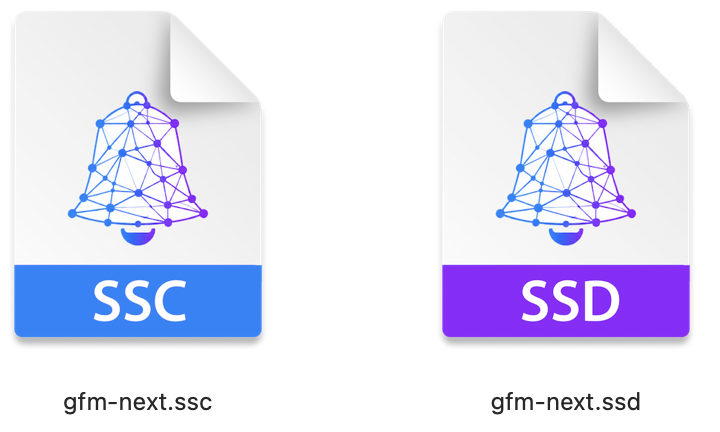
SchallOS therefore always separates the description of a solution from its business data. At its core, an application consists of two related containers: the SSC for the structure and the SSD for the production data.
Together, these two containers form the complete solution, but they serve different purposes. The SSC describes how the application is structured and how it works. The SSD contains the content generated during its use.
The SSC describes the application
The SSC file is the portable structure container for a SchallOS solution. It contains, among other things:
- Table and Field Definitions
- Relationships
- Layouts and Layout Objects
- Formulas and Custom Functions
- Functional Container
- Triggers and Navigation
- Language and Translation Information
- Documentation
- Version and Release Information
The SSC therefore does not contain the customers, items, orders, or invoices themselves. It defines which data structures exist, how they are represented, and which functions work with them. The semantic meaning of a solution also belongs in this container. In addition to its technical name, a field can include a business description, translations, validation rules, and notes for the AI layer. This makes the structure not only machine-readable but also easier to understand for developers, documentation, and migration.
The SSC thus serves as a portable application model that can be further developed and published independently of any specific dataset.
The SSD contains the production data
The SSD file is the solution’s data container. It contains the data records generated during daily operations, such as customers, quotes, orders, invoices, inventory transactions, or appointments. In addition, business histories and data events can be stored there. These include, for example, status changes, approvals, imports, or changes to particularly important fields. The term “SSD” does not refer to a physical data storage medium, but rather to the application’s logical data layer. How this data is technically stored depends on the selected deployment and database adapter.
IndexedDB can be used for a local single-user system. A desktop application can use SQLite, while larger multi-user systems use PostgreSQL. In all cases, the SSD remains the functional data container, even if the technical storage method differs.
Two containers must clearly belong together
The separation of structure and data must not result in arbitrary containers being combined with one another. SchallOS must be able to verify whether an SSC and an SSD actually belong to the same solution and whether their version numbers match. Solution identifiers, container identifiers, structure versions, checksums, and signatures can be used for this purpose. This allows the system to determine, prior to startup or an update, whether the combination is valid and whether any necessary data migrations have already been performed.
For example, this check prevents the accidental opening of another application's structure container with a production dataset. It also prevents a new SSC version from being activated if the SSD has not yet been prepared with the required data structure.
Portability Across Different Operating Models
The SSC/SSD separation lays the foundation for running an application in different environments. Layouts, formulas, and functional logic do not need to be redeveloped for each database adapter.
One solution could start with IndexedDB locally, then migrate to SQLite later, and switch to PostgreSQL as the user base grows. A transition to a cloud environment is also possible.
Such a migration remains a controlled technical process. Different databases have their own capabilities and limitations. Therefore, data is not simply transferred to another system at the push of a button. The transfer, verification, and, if necessary, rollback must be explicitly carried out.
However, the architecture ensures that a change in the data storage model does not automatically require the entire application to be rebuilt.
Updates Without Replacing Customer Data
A key advantage of this separation becomes apparent with new versions. Changes often affect layouts, formulas, functions, or the data model. The existing business data should remain intact.
A developer can therefore release a new SSC version while the customer’s SSD remains in place at the site. If new fields or tables are required, they are added through defined migration steps. The current state can be backed up before the update. The structure, data migration, and functionality are then verified. The update is considered complete only when the SSC and SSD are once again in a consistent state.
This update capability is not intended solely for SchallOS itself. It is also available for customer solutions developed using SchallOS.
Customized variants remain traceable
Custom business software often evolves differently for different customers. One customer may need custom fields, while another may require additional layouts or a specific interface. Without a clear structure, this can quickly result in complete copies that differ from one another, making it difficult to maintain them collectively. In the SSC, however, general product components and customer-specific extensions can be versioned and documented in a traceable manner.
The architecture does not make the decision for the developer as to which customization belongs in the overall product. However, it ensures that the origin and dependencies of a change remain visible.
When combined with development logs and release notes, this makes it easier to identify which components need to be replaced, added, or retained during future updates.
Multilingualism is part of the portable structure
The language layer is also embedded in the SSC. Labels are not stored exclusively as fixed values in individual layout objects; instead, they can refer to semantic entries with multiple language versions.
This allows a field such as „Invoice Number“ to be displayed in different languages without having to create an entirely new layout for each language. A migrated FileMaker solution can be automatically converted to a multilingual format and translated during the migration process.
Automatic translation is no substitute for professional review. Legal and industry-specific terms, in particular, must be checked. However, the architecture ensures that multilingual support is built into the solution from the start, rather than having to be laboriously integrated into each form later on.
The Foundation for Long-Term Maintainability
At first glance, SSC and SSD seem like a simple separation of application and data. In reality, however, they form the basis for portability, updates, different database adapters, separate backups, and various operating models.
The SSC describes what a solution is and how it works. The SSD contains the data generated during its use that must be permanently retained for the respective company.
This clear separation allows the application to evolve without requiring the entire database to be replaced with each new version. At the same time, the technical data storage can grow or change without requiring layouts and business logic to be completely rebuilt.
SchallOS Studio as an Integrated Development Environment
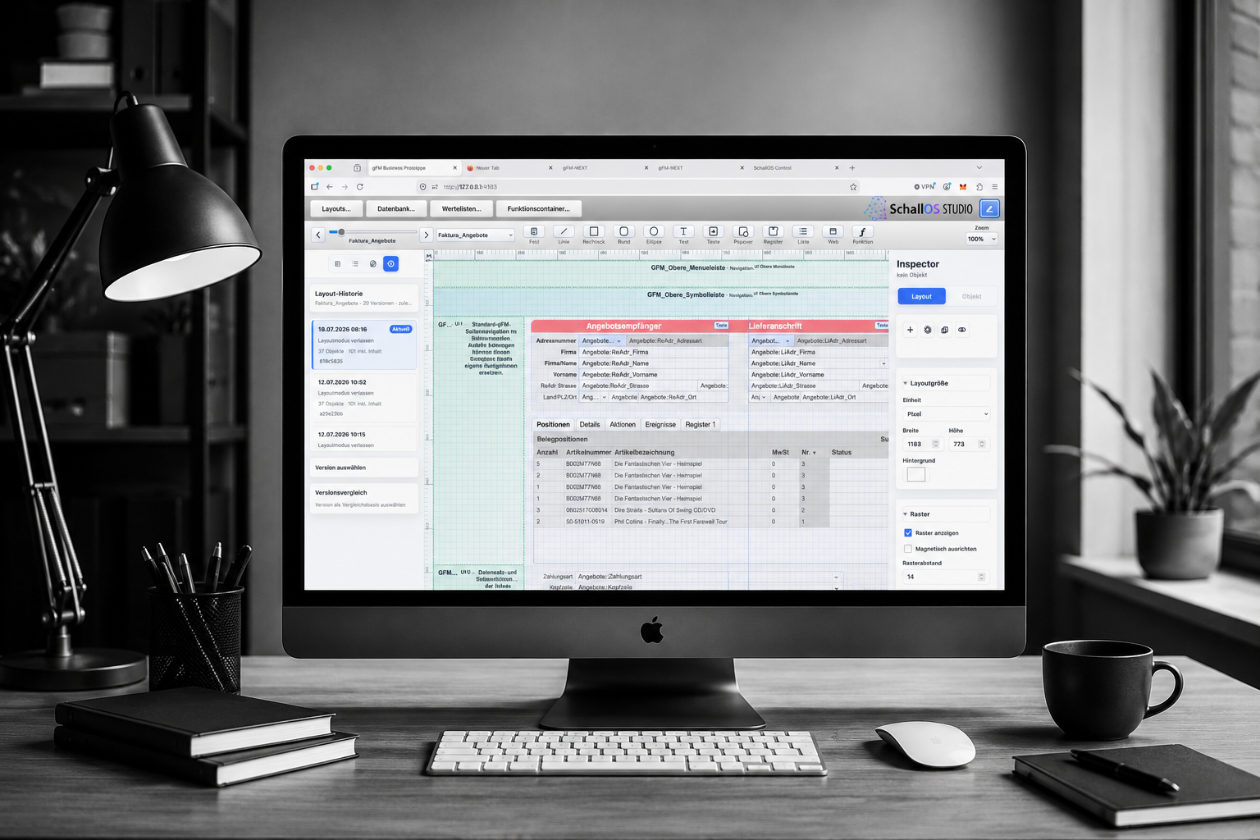
SchallOS Studio is the part of the platform where new business applications are created and existing FileMaker solutions are migrated or further developed. There, tables, fields, relationships, layouts, formulas, functions, languages, and releases are managed within a shared environment.
For FileMaker developers, the basic workflow should feel familiar. Changes are not made exclusively in abstract source code files, but remain linked to the visible components of the application. A developer can edit a layout, select a field, change its properties, and immediately see how the change affects the application.
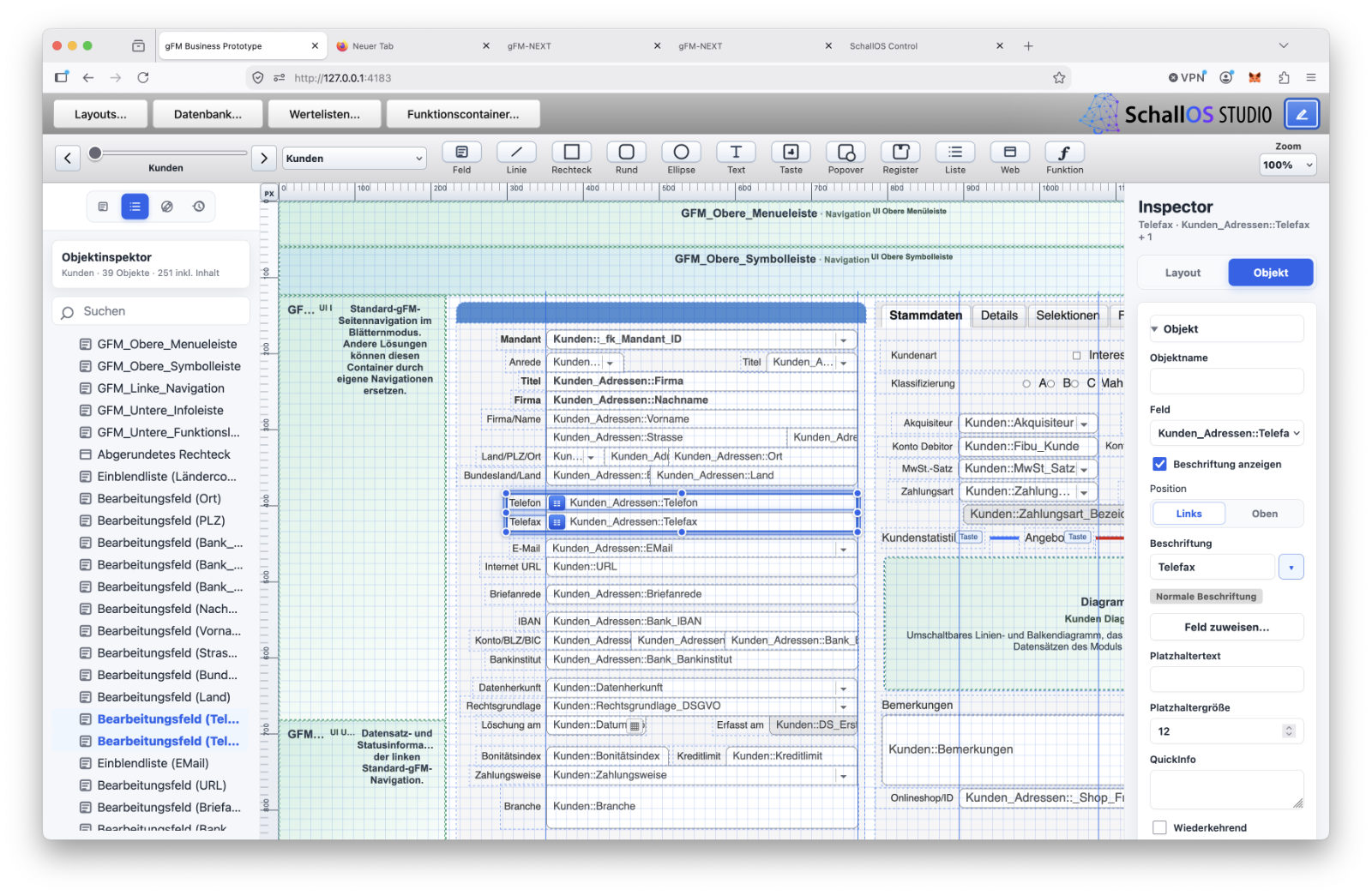
Nevertheless, SchallOS does not attempt to fully replicate FileMaker. It primarily adopts the proven core concepts: rapid development, immediate feedback, and a close connection between the data model, user interface, and business logic. The technical foundation, on the other hand, is being reorganized and geared toward portable structures, AI-assisted programming, documentation, and controlled releases.
Layouts, Objects, and Properties
A key component of SchallOS Studio is Layout Mode. This is where input forms, lists, dialog boxes, navigation areas, and other user interface elements of a solution are created.
Possible layout objects include fields, text, buttons, list objects, tab areas, popovers, containers, and navigation elements, among others. These objects can be selected, positioned, and configured using an inspector.
A layout object contains more than just information about its size, position, and appearance. It can also be linked to data sources, triggers, formulas, functions, and semantic labels. For example, a field object refers to a field in the data model, can be given a language-dependent label, and can trigger specific functions when a user enters or exits it.
Since every object is part of the SSC, layout changes can be versioned, documented, and later deployed in a targeted manner via an update. The user interface is therefore not an isolated graphical layer, but rather a structured component of the entire application.
Data Model and Semantic Descriptions
Tables, fields, and relationships are also created and edited in SchallOS Studio. New applications can be built entirely within the program. During a FileMaker migration, the migration wizard imports the existing structures as far as possible and then makes them available for further editing.
In SchallOS, a field consists of more than just a technical name and a data type. It can also include a business description, validation rules, default values, translations, and documentation notes.
This information serves several purposes. It helps other developers understand the solution, supports automated documentation, and provides the integrated AI with better context. For example, rather than simply recognizing that a field is named „Status,“ the platform can determine whether it refers to an order status, a payment status, or an internal processing status.
Relationships between tables can also be described and documented in their business context. As a result, less knowledge remains locked away exclusively in the mind of the original developer.
Formulas with Real-Time Calculations
SchallOS has its own formula environment. Formulas are created in the formula editor and calculated in real time as you edit them. This allows you to immediately verify changes to an expression using appropriate test values or the current dataset.
The formula language supports the typical calculations required in business applications. These include mathematical operations, text processing, date and time calculations, logical conditions, field references, variables, and nested expressions.
The available set of commands is initially smaller than the feature set of FileMaker, which has grown over decades. SchallOS does not need to replicate every historical FileMaker command exactly as it was. What is more important is a clearly structured and extensible formula environment.
Additional commands can be added later if they are needed for specific solutions or migrations. The integrated AI can also help transfer an existing calculation or develop a missing function that fits the SchallOS architecture.
Custom Functions for Reusable Calculations
In addition to the built-in commands, SchallOS supports custom functions. These functions accept parameters, perform a defined calculation, and return a result. This allows recurring rules to be managed in a central location. Examples include price calculations, deadline determinations, formatting, validating number ranges, or processing imported values.
Custom functions are also calculated in real time and can be tested immediately in the formula editor. If a function is later corrected or expanded, all formulas that use it will benefit.
In addition, you can describe and document your own functions. This ensures that parameters, return values, examples, and known error cases remain traceable. The collection of functions in a solution evolves into a reusable library, rather than consisting of numerous copied individual calculations.
Function containers for more complex workflows
More complex business processes are organized in SchallOS using function containers. For example, you can create data records, validate values, control dialogs, generate documents, or interact with external interfaces. A function container contains more than just executable code. It also includes a functional description, input parameters, return values, dependencies, permitted capabilities, and explicitly excluded operations.
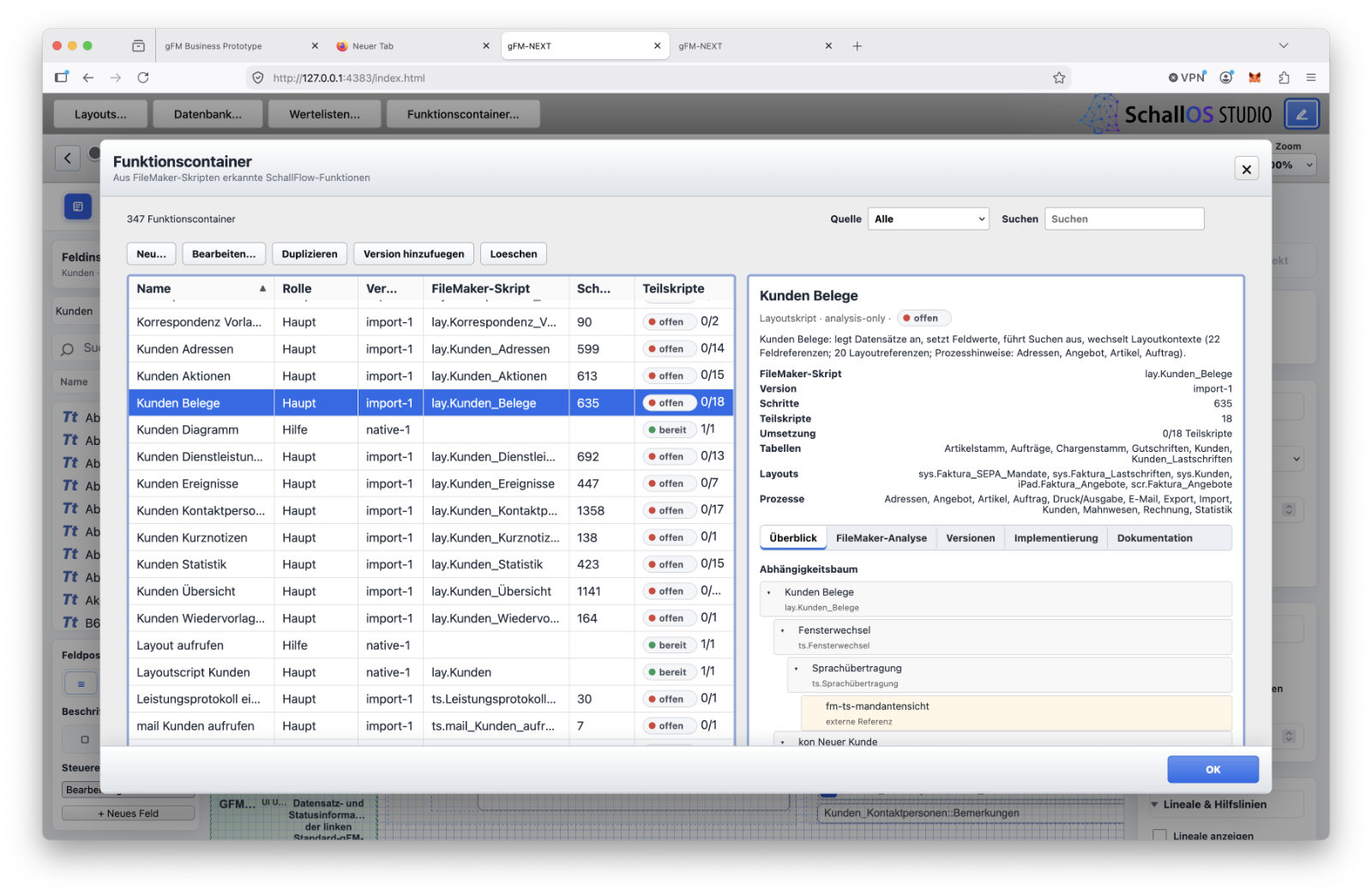
Multiple layout objects can use the same function container. This means that a function for creating an invoice does not have to be recreated for every button or layout.
For migrated solutions, existing FileMaker scripts can be retained in the background as a learning and reference layer. They help clarify the original intent and the previous workflow. However, the new executable code is generated to match the SchallOS architecture.
Migration and New Development in the Same Environment
SchallOS Studio is not exclusively intended for existing FileMaker solutions. New applications can be developed entirely within the platform.
During a migration, the wizard first imports existing tables, fields, relationships, layouts, and other identifiable components. Developers can then review and clean up the imported structure and gradually migrate it to the new functional architecture.
The goal is not to create an unchanged copy of all previous features. Workarounds that have developed over time can be reviewed and replaced with clearer structures. At the same time, the technical knowledge embedded in the existing solution is preserved.
New and migrated applications then use the same tools, containers, and deployment methods.
Changes become controlled releases
A change made in the Studio does not automatically result in a production-ready update. During development, there may be unfinished layouts, preliminary formulas, or untested functions.
Related changes can therefore be recorded in change sessions and later assigned to a release. Only after review and approval do these changes become a published SSC version.
In addition to the new structure, a release may also include necessary data migrations, version information, dependencies, testing steps, and documentation. This ensures that the actual development remains clearly separated from deployment to production runtime instances.
SchallOS Studio is therefore not just the place where an application is designed and programmed. It combines visual development, data models, formulas, functions, documentation, and publishing in a single environment.
The familiar connection between the developer and the visible application is maintained. At the same time, a technical foundation is established on which solutions can be further developed in a way that ensures they are portable, traceable, and maintainable over the long term.
AI Where Formulas and Functions Are Created
In many development environments, artificial intelligence has so far been offered primarily through an additional chat window. The developer describes a problem, copies source code or formulas into the chat, and then pastes the result back into the project. In doing so, the language model often lacks important information about tables, fields, relationships, and the business context of the application.
That is why SchallOS integrates AI directly into the development tools. It is available wherever formulas, custom functions, and function containers are being edited. This allows it to access not only a single question but also the current context of the solution.
In the formula editor, for example, the AI knows the expression being edited, the available fields, and the expected result type. Within a function container, it can also access the container’s description, parameters, capabilities, and dependencies.
This means that AI will not become a separate utility program, but rather an integral part of the actual development environment.
Support in the Formula Editor
Formulas control numerous processes in a business application. They calculate prices, check conditions, determine deadlines, or influence the display of layout objects. Among other things, the integrated AI can do the following in the formula editor:
- Explain an existing formula
- Investigate possible errors
- Add Terms and Conditions
- Simplify an expression
- Convert a FileMaker formula
- or create a new calculation based on a technical description.
For example, a developer could specify that orders above a certain net value require additional approval, provided there is no framework agreement in place. The AI can generate a formula based on this, drawing on the fields available in the solution. The result remains visible as a standard formula. It can be read, modified, and calculated in real time. Thus, the AI does not create a hidden process whose behavior would be difficult to understand.
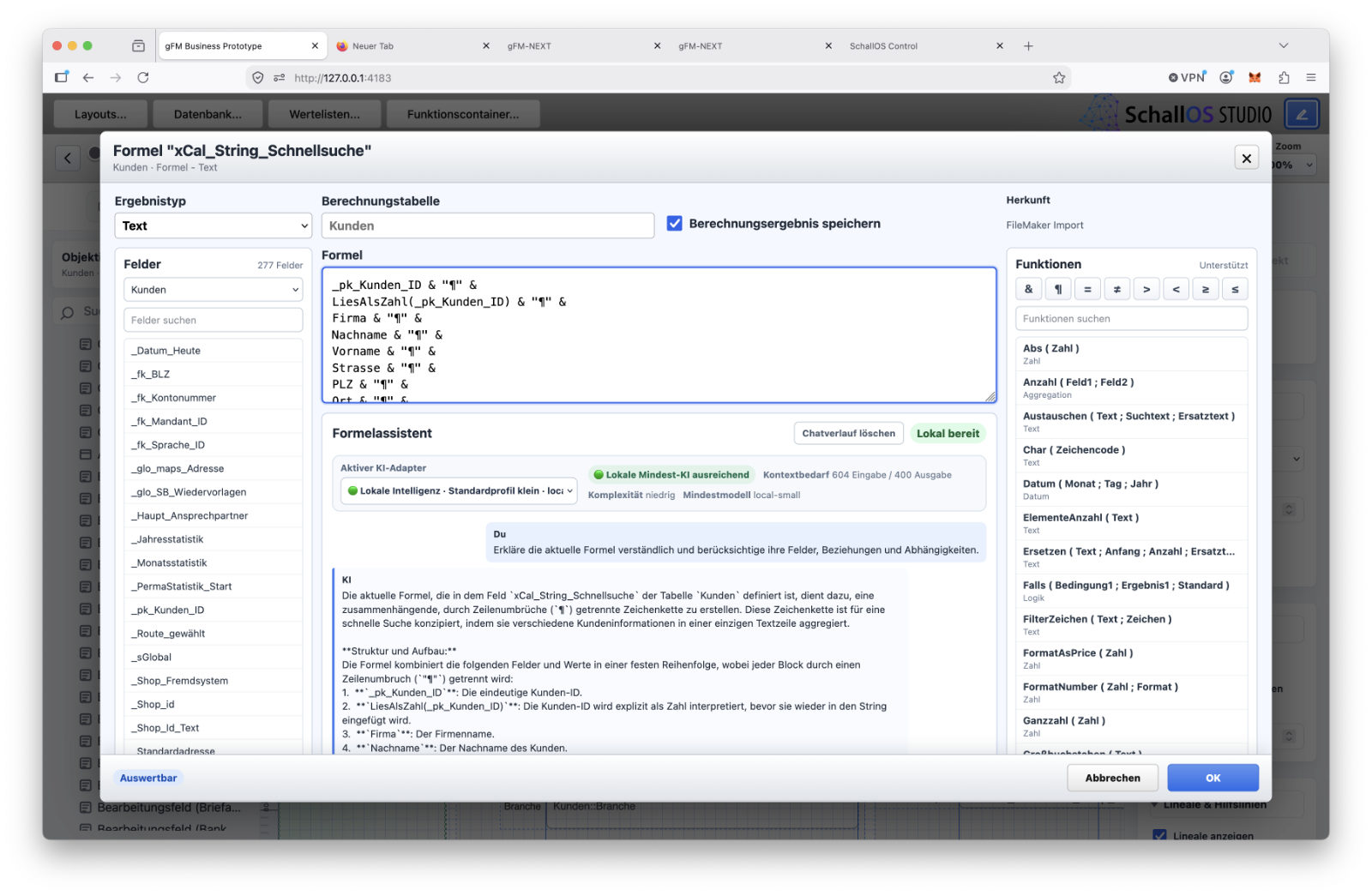
If a required command is missing, the AI can also help create a suitable custom function or an extension to the formula environment. This ensures that SchallOS’s initially limited set of commands remains expandable.
Custom Functions Based on Business Requirements
Recurring calculations can be managed centrally as custom functions. The AI can generate a function with unique parameters, a return value, and documented behavior based on a description.
Such a function could, for example, calculate discount periods, check number ranges, or standardize imported values. In addition to the actual printout, test values, examples, and possible error scenarios can also be generated.
This doesn't just make the initial programming easier. If changes are made later, the AI can recognize the function's purpose and where it is used.
This turns an anonymous calculation into a documented and reusable component of the solution.
Function containers as described program logic
In SchallOS, more complex processes are organized using function containers. For example, a function container can create data records, validate input, control dialogs, generate documents, or call external interfaces. These are based on a structured description, which can specify:
- what purpose the function serves
- which parameters are passed
- what result is expected
- which tables and fields may be accessed
- which other functions are used
- and which transactions are expressly excluded.
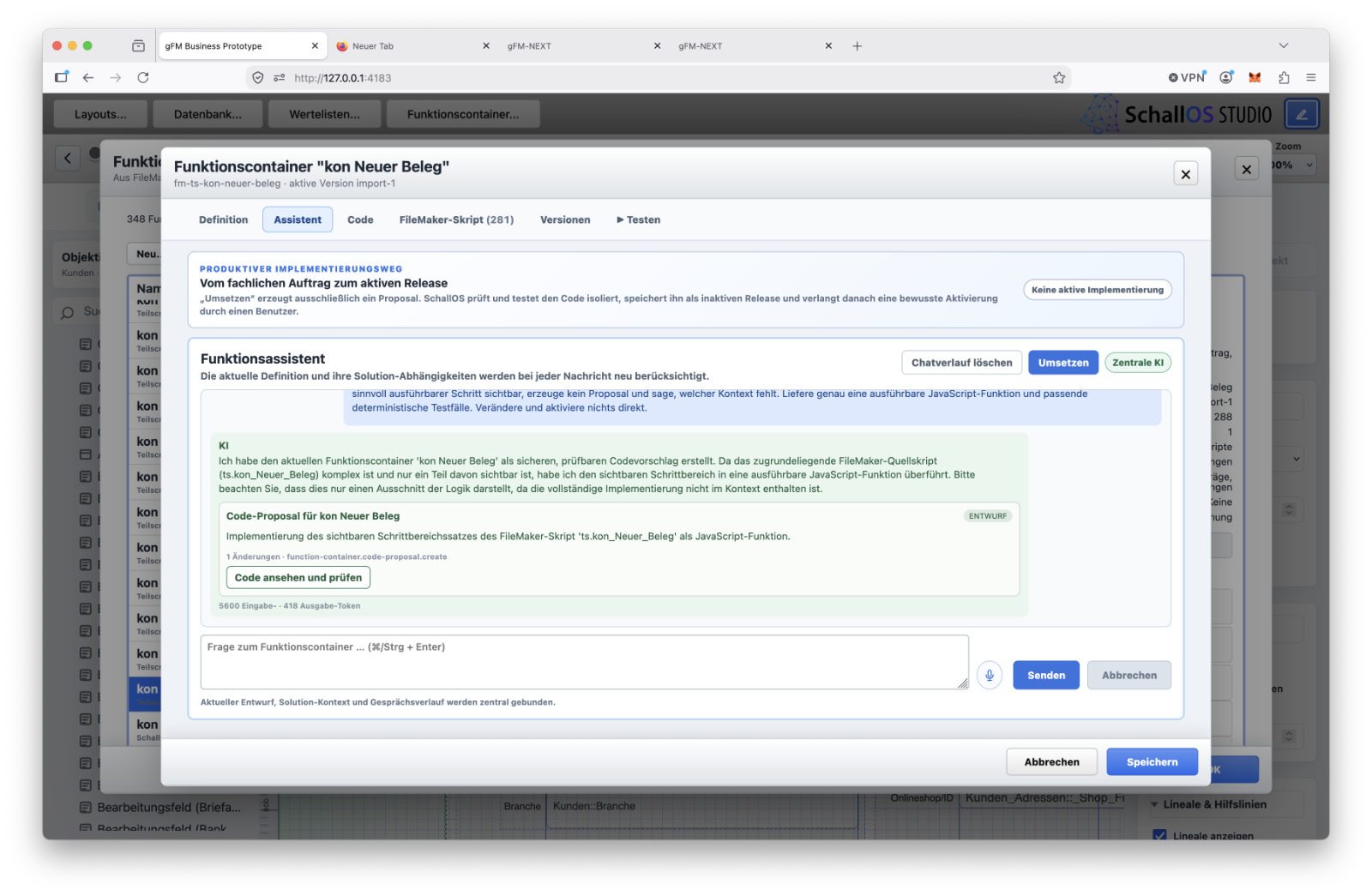
Based on these specifications, the AI programs the executable code for the function container. As a result, the developer no longer has to assemble the workflow exclusively from numerous individual script steps. The developer’s role shifts more toward precisely describing the desired function, its limits, and the subsequent verification.
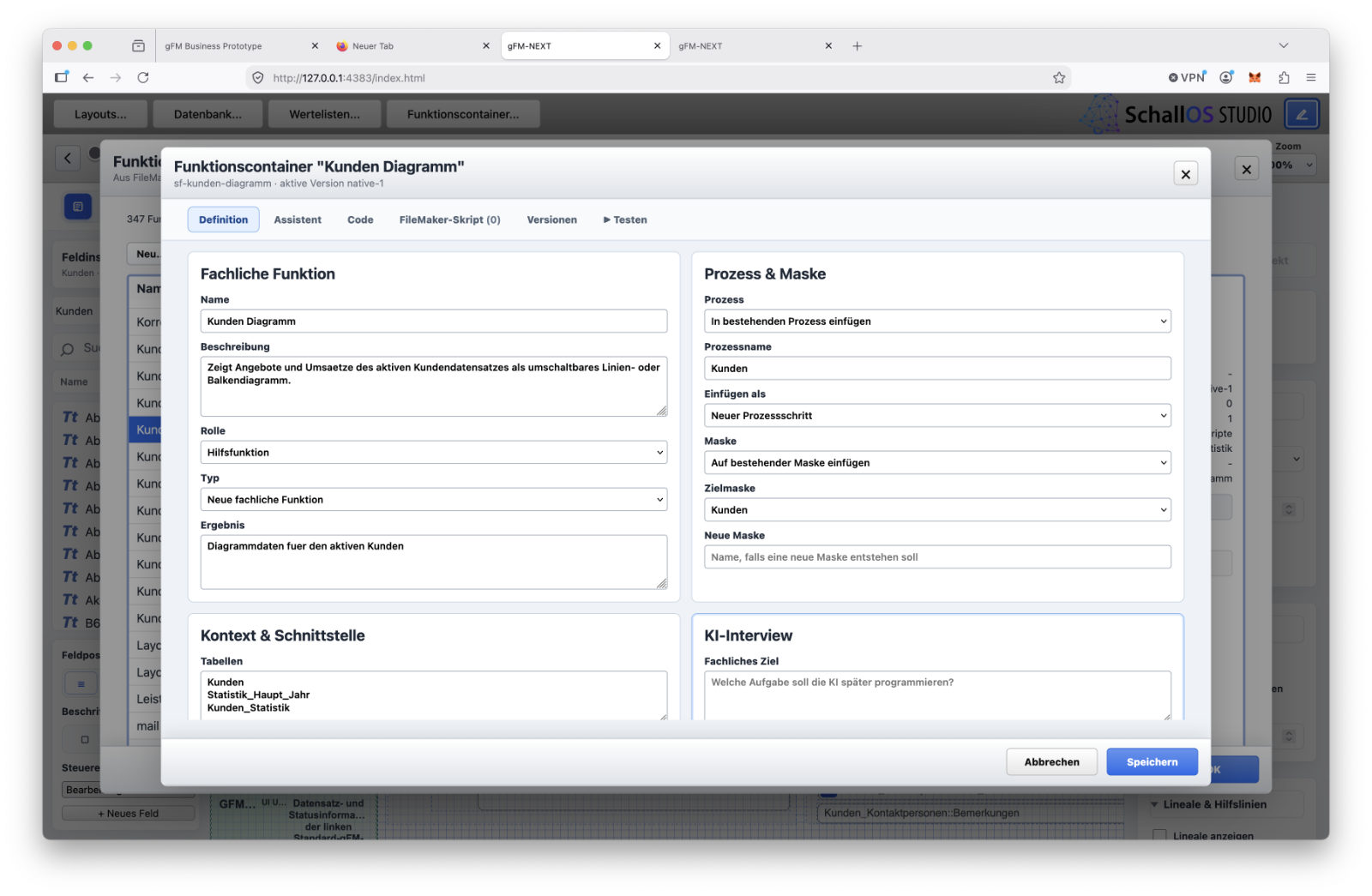
The generated code remains visible, however. It can be read, tested, revised, and compared across different versions. Earlier versions can also be retained and restored as needed. AI thus handles the programming, but not the technical responsibility.
FileMaker Scripts as a Learning Layer
In migrated FileMaker solutions, the existing scripts often contain a large portion of the business logic that has been developed over the years. They show which fields were modified, which conditions were checked, and which other processes were called.
These scripts are not permanently incorporated into SchallOS as an executable runtime layer. Doing so would simply shift many legacy technical dependencies and workarounds into the new system. Instead, the original FileMaker script can remain in the background of the corresponding function container. It serves as a learning, reference, and comprehension layer for the AI.
The AI can use this to deduce the business intent behind the existing workflow. It then generates the new code to fit the SchallOS architecture. Legacy designs—such as frequent layout changes, global fields, or context-dependent helper scripts—do not have to be carried over unchanged. They are retained only if they are actually necessary for the core business process.
The original script is nevertheless retained as a source of information. If questions arise later, it allows you to see how a particular process was originally implemented in the FileMaker solution.
Capabilities and limitations are explicitly defined
A function container should not be able to access arbitrary parts of the application based solely on a general description. For this reason, permitted capabilities and exclusions can be explicitly defined.
For example, a function may be allowed to read and modify records in a specific table without being able to perform deletions or make changes to system configurations at the same time. If the generated code uses an unauthorized capability, SchallOS can detect this and block its execution or publication.
The description of a function container is therefore not merely for documentation purposes. It becomes part of the verification and safety model. This limitation is particularly important for AI-generated code. The language model is given a clear scope of action, while the platform verifies whether the generated function remains within that scope.
The right context improves results
The quality of an AI-generated function does not depend solely on the size of the language model used. What matters most is whether the model receives the necessary information. SchallOS can construct context from multiple levels:
- the current question
- the open editor
- the selected field or function container
- the tables and relationships involved
- existing formulas and functions
- semantic descriptions
- Documentation and Change History
- as well as the original FileMaker script during migrations.
This allows the AI to work much more accurately than it would with an isolated query in a general chat.
At the same time, it is not necessary to provide the complete solution for every task. The context can be limited to the information that is actually needed for the specific function.
Interchangeable Models Instead of Long-Term Commitment
The AI layer should not be permanently dependent on a single model or provider. Different tasks have different requirements in terms of quality, speed, cost, and data protection.
A complex migration may require a particularly powerful model. A simple explanation or formula adjustment can possibly be carried out using a smaller model. For sensitive or isolated environments, locally operated models can also be used in the long term.
The permanent knowledge base therefore lies not in the language model, but in the SchallOS solution: in descriptions, structures, script references, code, tests, and documentation. The AI model remains an interchangeable tool that generates executable code or understandable suggestions from this context.
Transparent AI-Driven Development
SchallOS combines hands-on work with business applications with AI-powered programming. Formulas can be explained and generated directly. Custom functions are created from reusable business specifications. Function containers link semantic descriptions with visible and verifiable code.
In migrated solutions, FileMaker scripts are retained as an additional layer of knowledge. They help in understanding existing business processes without permanently perpetuating previous technical dependencies.
This does not mean that the developer’s role will disappear. It is changing. Precise requirements, sound architecture, testing, and technical oversight are becoming more important than manually entering every single step of a program. This responsibility remains indispensable, especially when it comes to business-critical software.
Current survey on the use of local AI systems
Documentation and event logs as part of the application
The documentation for a business application is often not written until development is already complete. When under time pressure, the initial focus is on new fields, layouts, formulas, and functions. The description of the changes is to follow later.
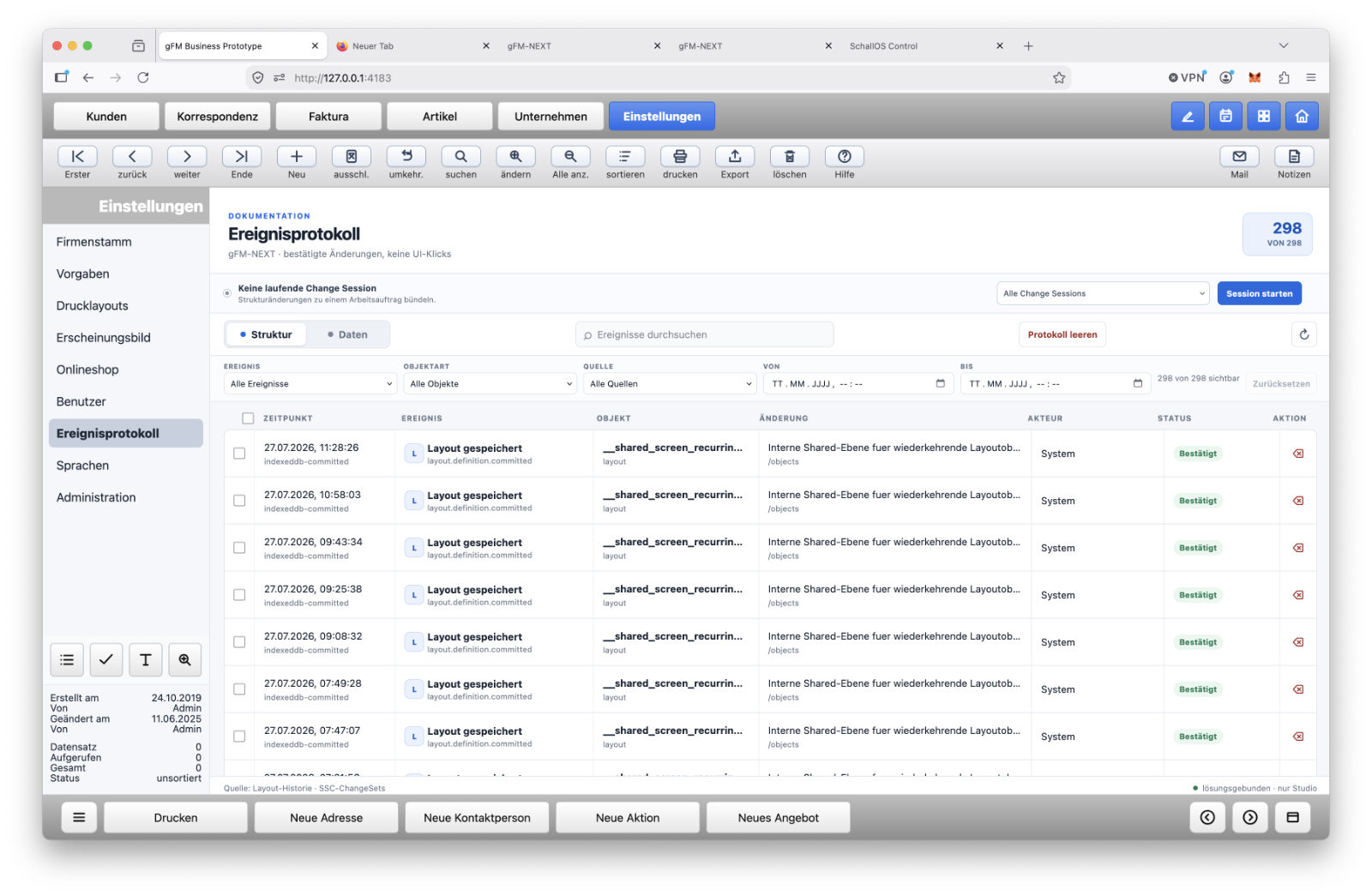
However, as time passes, it becomes more difficult to understand the original decisions. Often, it is no longer clear exactly why a particular feature was added, which objects were affected, and which special cases had to be taken into account. SchallOS therefore does not treat documentation as an after-the-fact, additional task. Relevant changes are recorded as events during development and linked to the affected components of the solution.
This information can then be used to generate technical documentation, release notes, customer reports, or performance logs. The documentation is thus based not solely on memories or handwritten notes, but on the changes that were actually made.
Events on Multiple Levels
A SchallOS solution does not rely on a single, general-purpose protocol. The platform distinguishes between different event levels, each with its own tasks.
- The Structure Log records changes to the SSC. These include, for example, new tables and fields, modified layouts, changed formulas, or new function containers.
- The Data Event Log It is part of the SSD. The SSD records business-related transactions that occur during production use, such as status changes, approvals, cancellations, or modifications to important data records.
- In addition, there are Operational Events from Runtime and SchallOS Control. These include, among other things, deployments, updates, checks, backups, and rollback operations.
These areas remain separate but can be linked. A development log should not become cluttered by day-to-day changes to customer records. Conversely, internal technical details do not automatically belong in the business history of an invoice or an order.
The structure log shows the evolution of the solution
Changes to tables, fields, layouts, formulas, and function containers can be saved as structured events. An entry can record which object was modified, what its previous state was, and what its new state is. Additionally, the developer, date and time, business rationale, associated order, and planned release version can be recorded.
For example, if a new approval process for orders is added, this may result in several technical changes. A status field is created, a layout is expanded, a formula is adjusted, and a new function container is programmed.
The structure log records these individual events. At the same time, they can be grouped under a common business task. This makes it clear that several technical changes together form a new business process.
Change Sessions group related tasks together
A development task often consists of many small steps. A purely chronological list of individual changes would not adequately reflect the actual context.
SchallOS can therefore group related tasks into Change Sessions. A Change Session describes a specific task, enhancement, or bug fix and collects all related events. For example, it may include:
- the job description
- Affected tables and layouts
- Changes to Formulas and Functions
- tests conducted
- outstanding issues
- as well as the assignment to a customer or order.
Multiple change sessions can be assigned to a release at a later time. This creates a traceable link between the development request, technical changes, and the released version.
AI presents technical events in an easy-to-understand way
The documentation layer is connected to SchallOS's integrated AI. This allows logged events to be automatically formatted for different target audiences.
A technical development report requires different information than a customer update. While developers want to see specific field names, function containers, and data migrations, customers are primarily interested in which features have been added and what benefits they offer. AI can therefore summarize the same events in different ways:
- as internal technical documentation
- as clear customer information
- as release notes
- as a project report
- or as proof of payment for an invoice.
The texts are not generated freely from a general description. They are derived from the Change Sessions, semantic object descriptions, and actual structural changes.
The generated text remains linked to its sources. The developer can check which events a statement is based on and correct or approve the wording before it is used.
Performance Reports for Developers and Customers
For developers of custom software, documentation is also important from a business perspective. Services must be clearly explained to the client and are often billed by the hour or by work package.
In practice, these service logs are often compiled only shortly before an invoice is issued. This requires searching through emails, notes, and reminders.
SchallOS can assign the development events that were actually recorded to a customer, project, or order. The AI then generates appropriate entries for a work log based on this information. For example, multiple technical changes can be summarized into a single, easy-to-understand work item:
Expansion of order management to include a two-step approval process, including status checks, user permissions, and customization of the input form.
The underlying technical processes remain visible. The customer description is merely an easy-to-understand summary. The final decision rests with the developer. Not every technical event is automatically billable, and internal tests or corrections do not need to appear individually on an invoice.
Data-Level Events
All intended data events can also be logged during live operation. These include the creation and modification of data records, status changes, approvals, imports, exports, and automatically executed processes. An entry can record:
- which user or process triggered the action
- which record was affected
- which values were changed
- which function was executed
- and whether the process was completed successfully.
The specific solution determines which events are stored and at what level of detail. A minor text correction has a different significance than a change to an invoice that has already been approved. The data event log thus constitutes the business history of the SSD. It supports technical support, error analysis, and the traceability of important business processes.
Such a log can also serve as a basis for audit requirements. However, it must be verified for each specific use case whether it meets all legal or industry-specific requirements.
Documentation also accompanies releases and updates
The development events that are tracked are simultaneously incorporated into the release and update pipeline. When a new version is released, SchallOS can automatically compile a list of which features have been added, which bugs have been fixed, and which data structures have been modified. This results in technical change logs, user notes, and migration information.
After installation, it is clear which version was deployed to a specific runtime instance and what changes it contained.
Operational events such as backups, tests, or a potential rollback are also documented. This makes it possible to determine not only what was developed, but also when a change was rolled out to production and with what results.
A growing knowledge base
The combination of event logs, semantic descriptions, and AI support creates a long-term knowledge base covering the entire solution. When changes are made later, it is not only possible to examine the current code; it is also possible to see when a feature was introduced, the business rationale behind it, and which other areas were affected at the time.
This knowledge is crucial, especially for business applications that have evolved over many years. A seemingly superfluous special case may have an important historical rationale. Without documentation, there is a risk that it will be accidentally removed during a later revision. SchallOS therefore preserves not only technical states but also the development history and the associated decisions.
Documentation thus becomes an active component of the application. It supports development, customer communication, billing, support, releases, and long-term maintainability—based on the events that actually took place in the system.
A system-wide update pipeline for the platform and applications
Business software rarely remains unchanged for long periods of time. New requirements, changes in legislation, bug fixes, and technical advancements regularly lead to new versions. Simply exchanging files is not enough. Before each update, it is necessary to verify which version is current, whether data structures need to be adjusted, and how the previous state can be restored in the event of an error.
In many custom applications, such processes are only developed after the fact. Updates are then distributed using manual instructions, backup copies, and customer-specific scripts. With each additional installation, the risk of differing version levels and ad-hoc solutions increases.
SchallOS therefore treats updates as a system-wide platform feature. Both SchallOS itself and the customer solutions developed using the platform are updated via the same basic pipeline.
This means a developer does not have to design a separate update process for a new application. Versioning, testing, distribution, and logging are all part of the shared architecture from the very beginning.
Separating SSC and SSD protects production data
The ability to update data is directly related to the separation of structure and data. The SSC contains layouts, formulas, function containers, language definitions, and the application's data model. The SSD contains the company's production business data.
Therefore, when a new version is released, the entire application—including all customer data—is not replaced. Instead, a new SSC can be released while the existing SSD remains in place at the deployment site.
If the new structure requires additional fields, tables, or modified data formats, explicitly defined migration steps are carried out. The production data is adapted to the new structure in a controlled manner and is not replaced with a different dataset without notice.
This clear separation makes it possible to continue developing applications over many years without having to transfer all business data to a new complete file with every update.
From Development Status to Release
Not every change in SchallOS Studio is immediately suitable for production use. During development, there may be preliminary layouts, incomplete features, or formulas that have not yet been tested.
Related changes are therefore first recorded in change sessions and assigned to a planned release. Only after review and approval do they become a published version. A release may include, among other things:
- a unique version number
- the updated SSC
- Required SSD Migrations
- Technical Requirements
- Dependencies on the runtime or adapters
- Inspection and Testing Steps
- Release Notes
- as well as information for a possible rollback.
The documentation layer provides the foundation for this. Technical change lists and clear user instructions can be automatically generated from the logged development events.
A release therefore consists of more than just modified files. It also describes what has been changed, what prerequisites apply, and how the installation should be verified.
SchallOS Control manages the distribution
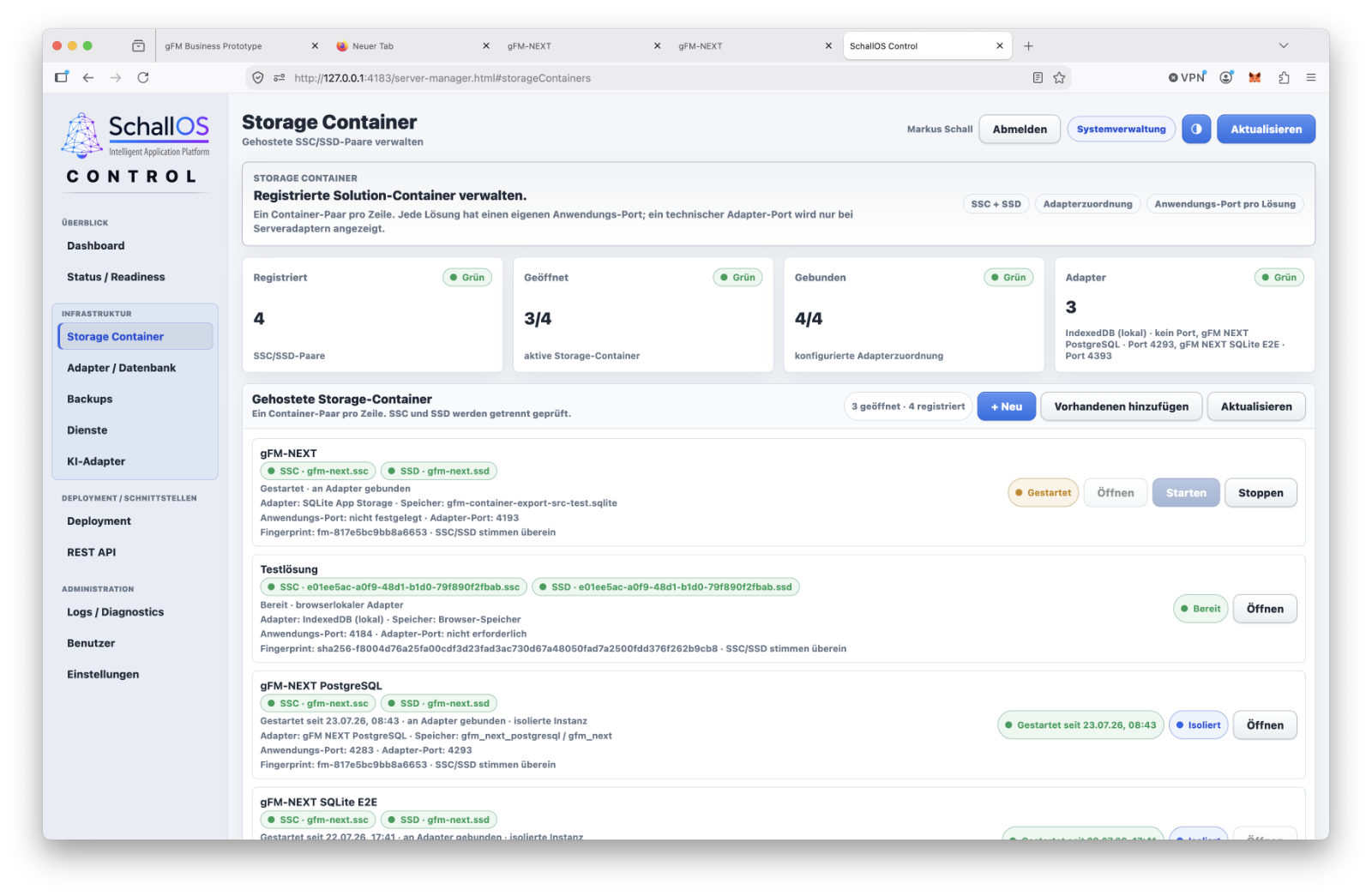
SchallOS Control handles the operational management of updates. It shows which instances are present, which versions have been install-ed, and which updates are available. Before installation, Control can check, among other things:
- whether the target entity is reachable
- which Runtime and SSC version is being used
- which database adapter is active
- whether a suitable backup can be created
- and whether all the requirements for the release have been met.
This prevents an update from being performed on an installation that is technically unsuitable or has not been fully prepared.
Furthermore, a release does not have to be deployed to all systems at the same time. It can initially be deployed in a test environment or on selected installations. A broader rollout takes place only after successful testing.
To this end, different update channels can be set up, such as stable production versions, pre-release versions, internal tests, or customer-specific releases.
Signatures and Unique Version Numbers
Update packages can be provided with checksums and digital signatures. SchallOS Control uses these to determine whether a package is complete, comes from the intended source, and has been modified since its release.
In addition, the system checks whether the release actually belongs to the respective solution. A new SSC must not be accidentally linked to the SSD of another application.
Unique solution identifiers, structure versions, and data model versions ensure that the install state remains traceable. Any necessary intermediate steps can also be identified. For example, an installation cannot be updated directly from a very old version to the latest version if a necessary data migration must be performed first.
Backup, Migration, and Verification
Before performing a structural update, the current state is backed up. The specific method used for the backup depends on the database adapter being used. A local IndexedDB or SQLite installation requires different procedures than a PostgreSQL server.
Next, the update package is checked, the new install structure is implemented, and any necessary data migration is performed. Activation is followed by verification. During this process, SchallOS can, for example, check:
- whether all expected tables and fields are present,
- whether the data migration was completed,
- whether the number of records and checksums are correct,
- and whether important functions are performing properly.
Only after these tests have been successfully completed is the update considered to be at the install stage. Simply transferring the files is therefore not sufficient. What matters is that the structure, data, and runtime subsequently form a consistent and functional whole again.
Rollback in Case of Failed Updates
Even with careful preparation, an update may fail. Unexpected legacy data, a faulty migration, or an unaccounted-for dependency can prevent a new version from being safely activated. In such cases, a rollback is part of the update procedure. This restores the previous SSC version, the backed-up SSD state, and the previous configuration.
However, not every update can be rolled back indefinitely. If new production data has already been processed according to the new rules after installation, a complete rollback may be problematic. A release must therefore specify the conditions under which a rollback is possible.
In some cases, a corrective follow-up update makes more sense than restoring an older dataset. The platform provides the technical framework, but the specific decision depends on the particular change and its business significance.
SchallOS itself also uses this pipeline
The update pipeline is not intended solely for customer solutions. SchallOS Studio, Runtime, Control, and other platform components are also updated using the same basic mechanisms. New platform versions may include enhancements to the formula environment, improvements to the AI layer, new database adapters, or security fixes. Here, too, version numbers, dependencies, signatures, and checks are required.
As a result, the infrastructure is utilized and continuously tested as part of the platform's day-to-day operations. Applications developed with SchallOS benefit from the same processes.
As a result, the developer does not receive merely a theoretical update function, but rather a pipeline that is integral to both the operation and further development of the entire system.
A planned path for future versions
The strength of the update pipeline lies not only in the automatic distribution of new files. What is crucial is the integration of development, documentation, backup, migration, testing, and rollback within a single, unified process.
SchallOS itself and the applications developed using it share the same underlying infrastructure. The separation of SSC and SSD ensures that the structure can continue to evolve while production data remains protected and is adapted in a controlled manner.
A solution developed with SchallOS therefore has a clear path for future versions right from the start. Especially for business software intended to be used for many years, this ability to be updated is not just an additional feature, but an essential prerequisite for long-term maintainability and reliable operation.
Runtime, Control, and Cloud for Various Operating Models
A development environment requires extensive capabilities. Developers must be able to modify structures, design layouts, edit formulas, and release new features. In the day-to-day operation of a finished business application, however, these tools are usually not needed.
SchallOS therefore divides development, execution, and management into separate areas. SchallOS Studio is used for development. SchallOS Runtime executes published applications. SchallOS Control manages their technical deployment. SchallOS Cloud offers the same basic architecture as a centrally operated online service.
This does not result in independent applications. All areas use the same SSC and SSD structures. The operating mode is defined via deployment, database adapters, and runtime profiles.
SchallOS Runtime executes published solutions
SchallOS Runtime connects an application's SSC to the associated SSD and makes the layouts, formulas, and functions defined therein available. Runtime features include, among other things, the display and operation of layouts, reading and editing data records, calculating formulas and custom functions, executing function containers, navigation and dialog control, multilingual support, and the connection to the designated database adapter.
However, the runtime does not automatically include all of SchallOS Studio's tools. It cannot create new SSC/SSD solution pairs and does not include a migration wizard for FileMaker solutions.
This ensures that a deployed customer application remains clearly separated from the actual development environment.
Profiles determine a runtime's capabilities
Not every installation requires the same set of features. A standard end-user application may only need to execute published layouts and business processes. An internal installation may require additional administrative or diagnostic features.
SchallOS uses runtime and capability profiles for this purpose. They define the technical capabilities of a specific instance.
For example, a profile can determine whether layout mode is available, whether data can be imported or exported, whether administrative dialogs are displayed, whether local settings can be changed, or whether certain interfaces can be used.
These profiles supplement the user permissions within the solution itself. User permissions determine what a person is allowed to do from a business perspective. The runtime profile, on the other hand, defines which technical capabilities the respective installation generally provides.
This allows the same runtime base to be used for different customer groups and use cases without having to develop a separate version of the program for each variant.
From a local single-user system to server operations
A SchallOS solution can be deployed in various operating modes. For a local single-user system, for example, the SSD can be stored in IndexedDB. An installed desktop application can use SQLite. For larger multi-user solutions, a central database such as PostgreSQL is recommended.
These operating models have different characteristics. IndexedDB is particularly well-suited for local browser applications. SQLite is a proven foundation for local applications and manageable installations. PostgreSQL is ideal for centralized multi-user systems with professional server management.
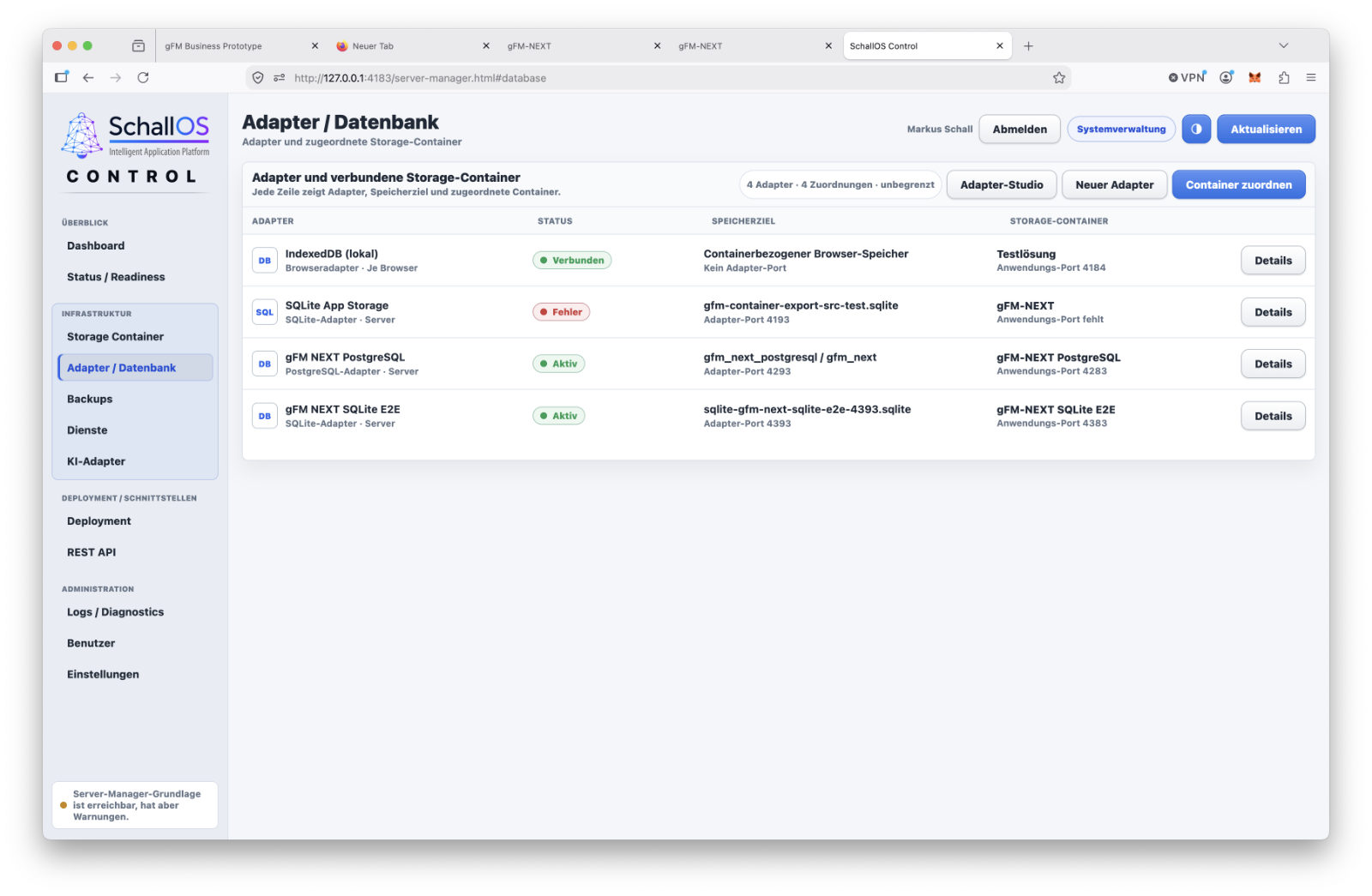
SchallOS does not treat these technologies as completely interchangeable storage locations. Switching adapters requires a controlled data transfer, validation, and, if necessary, a rollback. The shared SSC/SSD architecture ensures that layouts, formulas, and business logic do not have to be redeveloped from scratch for each database adapter.
Desktop Applications and Browser Use
SchallOS solutions are designed to run both in the browser and as standalone applications for Windows and macOS. A desktop runtime can integrate more closely with the respective operating system, use local files in a controlled manner, and—with the appropriate configuration—work offline temporarily. It can store its data locally using IndexedDB or SQLite, or access a central PostgreSQL database.
The application is rendered in the browser by the SchallOS Runtime itself. Neither a FileMaker server nor FileMaker WebDirect is required for this. After migration, a FileMaker solution no longer runs on a FileMaker file in the background. Layouts, formulas, and functional logic are executed within the SchallOS architecture.
SchallOS Control manages the instances
SchallOS Control serves as the platform's operational control center. It manages which solution is running on which target system and what technical requirements apply. Among other things, Control can display:
- which SSC/SSD pairs have been provisioned
- Which runtime version is installiert?
- which database adapter is being used
- Which capability profile applies?
- which updates are available
- and when an instance was last checked.
A deployment target can be, for example, a local Windows application, a macOS runtime, a dedicated PostgreSQL server, a test environment, or a cloud instance.
Operational information such as server addresses, database access credentials, licenses, or local device bindings does not belong in the portable SSC. This information is managed within the protected configuration of the respective instance.
Signed Solutions and Controlled Distribution
Portable solution containers must not allow any application to be modified arbitrarily or launched on systems for which it was not intended. Published SSC/SSD packages can therefore be associated with solution identifiers, checksums, signatures, and instance information. At startup, the runtime can verify whether the SSC is unmodified and validly signed, whether the SSD belongs to the correct solution, whether both version levels are compatible with each other, and whether a valid deployment profile is present.
Depending on the licensing model, a deployment may be tied to an instance, a server, a device, or a specified group of users. SchallOS Control also manages any necessary changes, such as a server change, reactivation, or the restoration of an installation.
SchallOS Cloud as a SaaS operating model
SchallOS Cloud delivers applications as a centrally managed online service. However, the cloud does not use its own, separate solution format. An application developed in SchallOS Studio can be assigned to a cloud instance and delivered via a browser. Runtime, database, backups, monitoring, and updates are managed centrally. For developers and customers, this results in a SaaS model without the need to redevelop the application specifically for a separate cloud platform.
Fundamental portability is maintained. A solution can be transferred later to a dedicated server or to another supported operating environment, provided that the data volume, functions, and technical requirements allow it. The transition remains a controlled migration but does not require a complete rebuild of the application.
A solution can grow along with your needs
A new application can initially be developed locally and tested with a small dataset. Later, it can be deployed as an internal runtime, migrated to SQLite or PostgreSQL, and finally published as a server or cloud solution. Tables, layouts, formulas, function containers, translations, and documentation remain part of the same solution structure throughout this process.
Not every prototype becomes a large-scale enterprise application without modifications. Multi-user operation, security, performance, and backup must still be carefully planned. However, the platform ensures that growth does not necessarily require a complete technology overhaul.
Runtime, Control, and Cloud thus combine different operating models within a common architecture. The application is developed once and then deployed in a controlled manner for the specific use case—locally, on a dedicated server, or as SaaS in the cloud.
Sure. I would insert this section right after the AI chapter or as an addendum to Chapter 4. It addresses an important point: AI is not tied to a specific provider but is treated as interchangeable infrastructure, much like database adapters.
AI Adapters Instead of Vendor Lock-in
SchallOS deliberately separates the actual AI layer from the language models it uses. The platform does not rely exclusively on a single provider or a specific runtime environment. Instead, various AI adapters can be set up and managed centrally.
These adapters serve as the link between SchallOS and the respective language models in use. This ensures that the actual development environment remains unaffected by whether a request is sent to a local model or to a cloud service.
AI thus becomes an interchangeable component of the platform—similar to the database adapters for IndexedDB, SQLite, or PostgreSQL.
Centralized Management in SchallOS Control
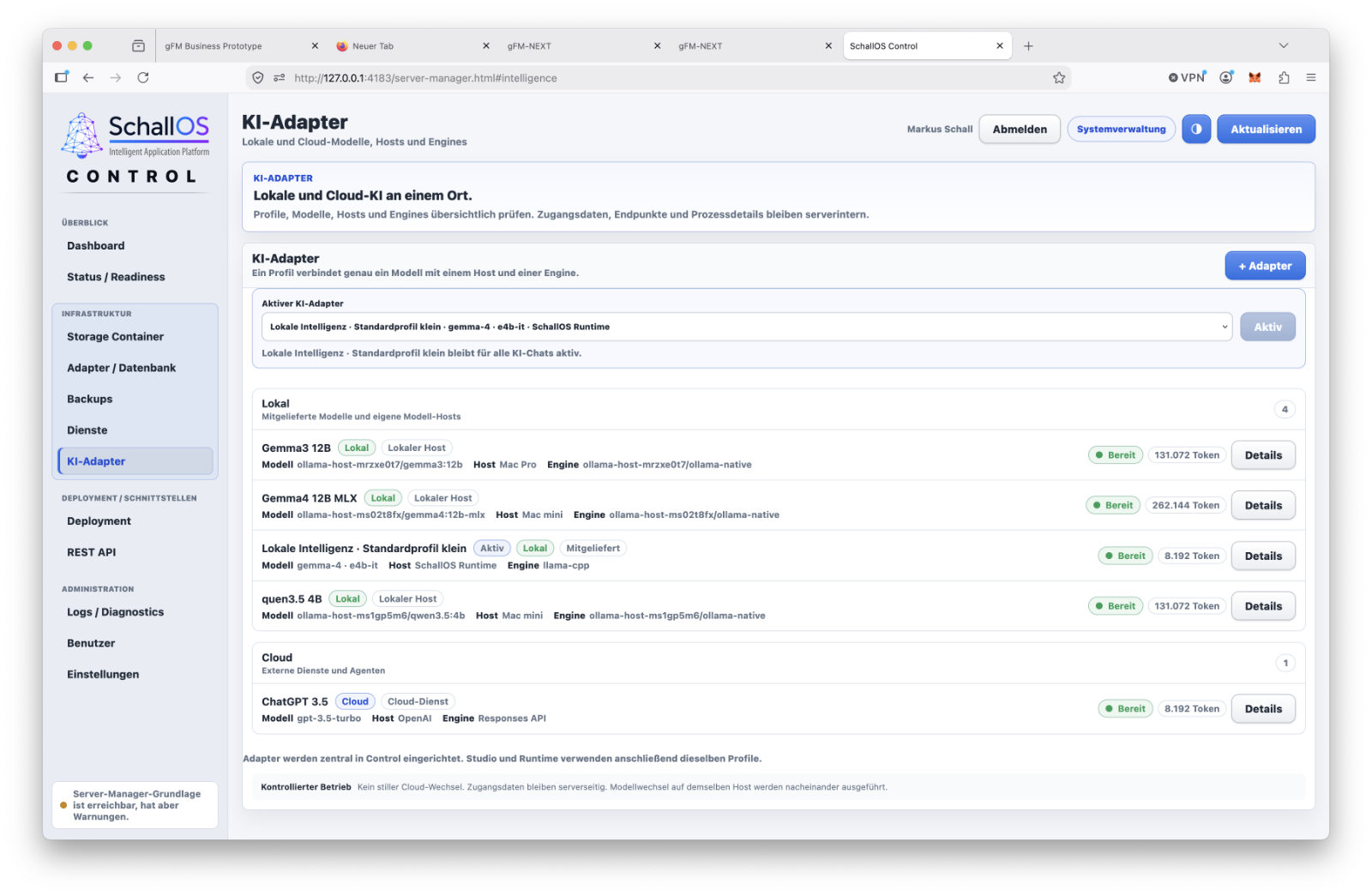
AI is configured centrally via SchallOS Control. There, you can create and manage as many AI adapters as you like. Both local models and cloud services are supported.
Local models can be integrated using Ollama or LM Studio, for example. For many development tasks, a compact local model that runs entirely on your own computer is sufficient.
In addition, cloud models such as ChatGPT, Claude, or other compatible services can be set up. Each adapter has its own configuration, including access credentials, endpoints, model names, and other technical settings. This provides a centralized overview of all available AI systems within a SchallOS installation.
Set it up once, access it anywhere
A major advantage of this architecture is that once an AI adapter has been set up, it is not limited to use in a single location. Once an adapter has been configured in SchallOS Control, it is available throughout the entire platform. For example, it can be used:
- in the formula editor
- within function containers
- for automatic documentation
- when migrating FileMaker solutions
- in Adapter Studio
- or in future AI-powered development tools.
Therefore, the developer does not need to configure access credentials or models multiple times. Management is handled centrally, while the individual components simply select the desired adapter.
The right model for the job
Not every development task requires the same amount of computing power. A small local model is often sufficient for a brief explanation of a formula. Extensive migrations or complex programming tasks, on the other hand, can benefit from a more powerful cloud model.
SchallOS therefore allows users to select different adapters depending on the specific use case. For example, a developer can specify that simple documentation be created locally by default, while particularly extensive tasks are handed off to an external model. This makes it easier to balance speed, data protection, and costs.
Open to Future Models
Developments in the field of artificial intelligence are progressing at an extraordinary pace. New models are released at frequent intervals, while existing systems are continuously being improved. SchallOS therefore does not tie itself permanently to a single provider. What matters is not the name of a specific model, but the standardized adapter interface.
New local or cloud-based AI systems can thus be added later without having to modify the actual development environment. This openness is consistent with the fundamental architecture of SchallOS. As with the database adapters, AI adapters should also remain interchangeable, while Studio, Runtime, and the actual application can continue to operate unchanged.
As a result, artificial intelligence will become a permanently integrated platform feature—regardless of which models or providers prevail in the market in the coming years.
A self-learning AI layer instead of static prompts
A key advancement of SchallOS is that its integrated AI no longer relies exclusively on static system prompts. Instead, it features a self-learning AI layer that continuously improves its performance based on real-world development projects.
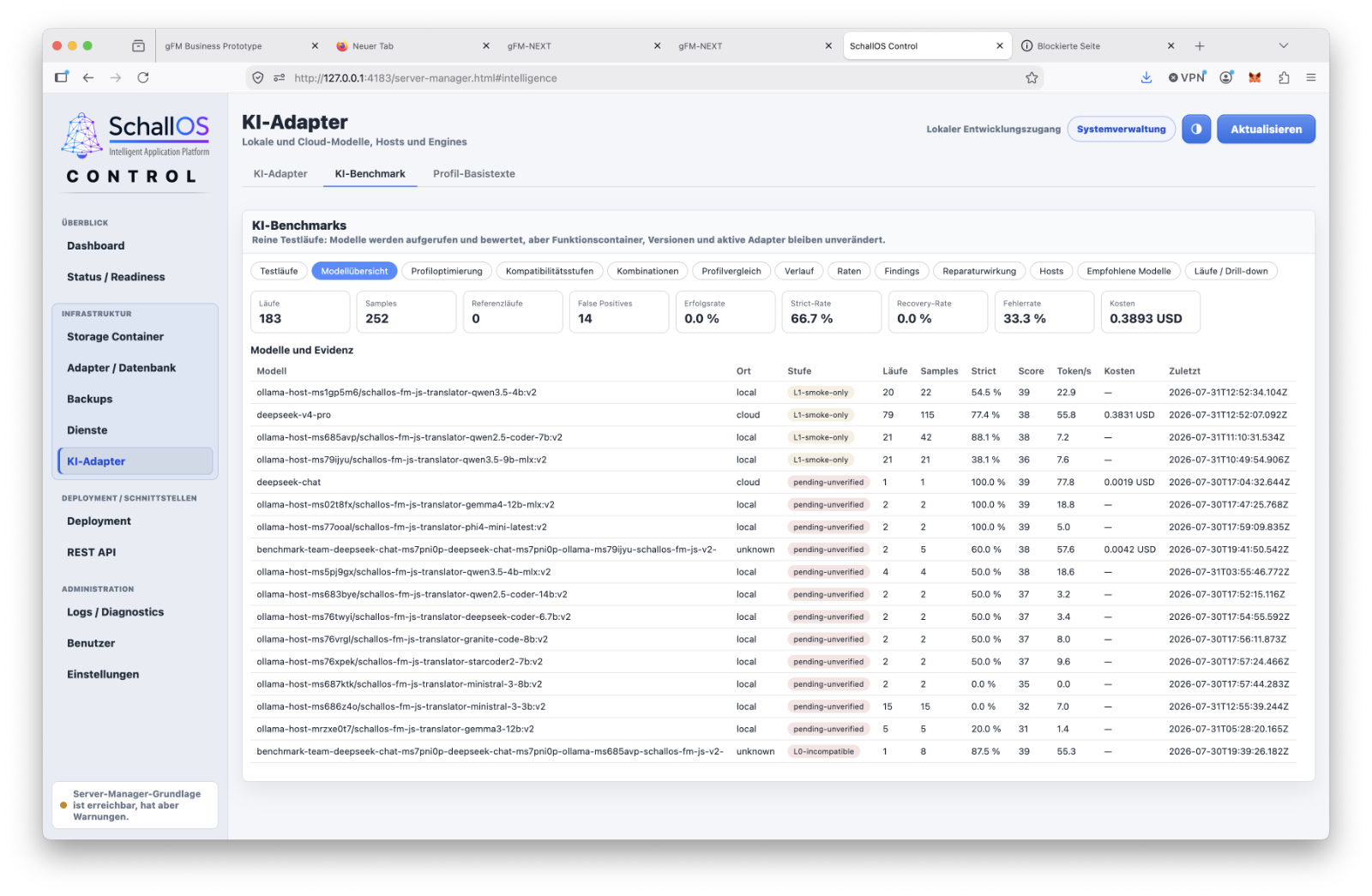
Each programming run of a function container can—if desired by the developer—provide anonymized quality data. In addition, reproducible benchmark runs are available, in which a solution’s actual function containers are automatically tested against various local and cloud-based AI models. SchallOS evaluates not only speed but, above all, the quality of the generated results, detected errors, repair cycles, and compliance with defined programming contracts.
This data is automatically used to generate versioned model profiles, learning patterns, and anti-patterns. The platform thus learns not only which prompts work better, but also which strategies have actually proven effective for specific model families, tasks, and error situations.
AI Levels from L1 to L4
SchallOS is introducing a multi-level qualification system for the AI models it uses. Instead of categorizing each model simply as „suitable“ or „unsuitable,“ the models are evaluated based on different task areas. For example, a model may achieve the highest qualification level for FileMaker migrations, while it is initially recommended only to a limited extent for new semantic developments. The classification is not based on manufacturer specifications, but exclusively on reproducible benchmarks and real production runs.
This allows SchallOS to automatically determine which model has the highest probability of success for a given task and when it would be appropriate to use a more powerful or alternative model.
Smart model profiles instead of traditional prompts
In the future, each supported AI model will have its own versioned model profile. This profile not only describes the actual system instructions but also includes insights gained from practical use specifically for that model.
Going forward, SchallOS will distinguish between profiles for, among other things:
- semantic function containers
- FileMaker Migrations
- Future migrations to Microsoft Access, 4D, or Oracle
- as well as other source systems
These profiles are supplemented by editable base profile texts that developers can customize or further refine through automated optimization campaigns. This allows SchallOS to test different variants overnight and automatically adopt the most successful strategies.
Solution Capabilities as an Intelligent Domain-Specific Interface
In addition to technical platform capabilities, SchallOS will introduce solution capabilities in the future. These describe the functional capabilities of a specific application and serve as the public interface between AI and business logic. Examples include functions such as:
- Create a Customer
- Create a Quote
- Accept the order
- Generate an invoice
- Post Payment
The AI may interact with a solution exclusively through these approved capabilities. Direct access to internal function containers is intentionally prohibited. This ensures that it is always clear which actions an AI is actually permitted to perform.
Developers can easily define and version their own solution capabilities. These are stored in the SSC along with the solution and are available to both the development AI and, later, end users.
Learning from Real-World Projects
The integrated benchmark engine does not use artificial sample programs; instead, it uses real function containers from the respective solution as a test basis, if desired. This results in a customized AI assessment for each application that is precisely tailored to the user’s own programming style, the business objects used, and the existing function containers.
The longer a solution is used and refined, the more extensive its learning patterns become, and the more accurately SchallOS can select appropriate models, avoid errors, and automatically generate new features.
Thus, the actual intelligence no longer lies exclusively in the language model itself, but increasingly in the solution and its continuously growing body of experiential knowledge.
Adapter Studio as a Universal Integration Platform
With the new Studio adapter, SchallOS is evolving into an open integration platform. In the future, external systems can be integrated via standardized adapters—whether they are databases, cloud services, REST interfaces, or AI systems.
This eliminates the need for rigid, proprietary integrations. Instead, developers can connect any external systems to their application using Solution Capabilities. Even complex hybrid solutions, in which multiple ERP systems are operated in parallel, can be elegantly orchestrated in this way. The AI accesses only defined capabilities and does not need to be aware of either internal data structures or the technical details of the connected systems.
Knowledge becomes the real capital
With SchallOS, the focus of modern software development is shifting significantly. It is no longer the actual program code that represents an application’s greatest value, but rather the structured knowledge about it. SchallOS also supports the new OKF format, which Google released in June 2026, so that knowledge can be integrated or shared in a portable way at a later date.
Functional containers, knowledge layers, learning patterns, capability contracts, benchmark results, and model-optimized profiles all become integral parts of the solution and can be deployed, versioned, and continuously refined alongside it.
As a result, every SchallOS application develops its own, ever-improving AI capabilities over time, which remain directly linked to the solution.
From the FileMaker Migration to an Independent Software Platform
SchallOS emerged from many years of work with FileMaker. Many of the platform’s core concepts are based on experience with custom database and ERP solutions that have evolved over the years alongside the company’s operational needs.
FileMaker excels in rapid development. The data model, layouts, and program logic are closely integrated; changes are immediately visible; and initial working solutions can be created relatively quickly.
This close integration between developers, data, and the user interface will be preserved in SchallOS. However, the technical foundation will be rebuilt from scratch. SchallOS uses its own runtime, its own structure and data containers, an AI-powered functionality layer, and its own infrastructure for documentation, deployment, and updates.
FileMaker thus remains an important starting point and a potential source for existing solutions. However, it is no longer necessary for future operation.
Migration is more than just importing a layout
A mature FileMaker solution consists of more than just tables, fields, and visible screens. A large part of its business knowledge is embedded in formulas, scripts, triggers, relationships, value lists, and numerous special cases.
A successful migration must capture these relationships and transfer them to a new architecture. Tables, fields, relationships, and layouts can largely be transferred in a structured manner. Formulas and custom functions are transferred to the SchallOS formula environment or adapted.
With the FileMaker scripts, the initial focus is on understanding their technical purpose. They can remain in place as a learning and reference layer in the background of the new function containers. However, the executable code is reprogrammed by AI to fit the SchallOS architecture. As a result, there is no FileMaker runtime within a new system. The existing solution is gradually transformed into a standalone SchallOS application.
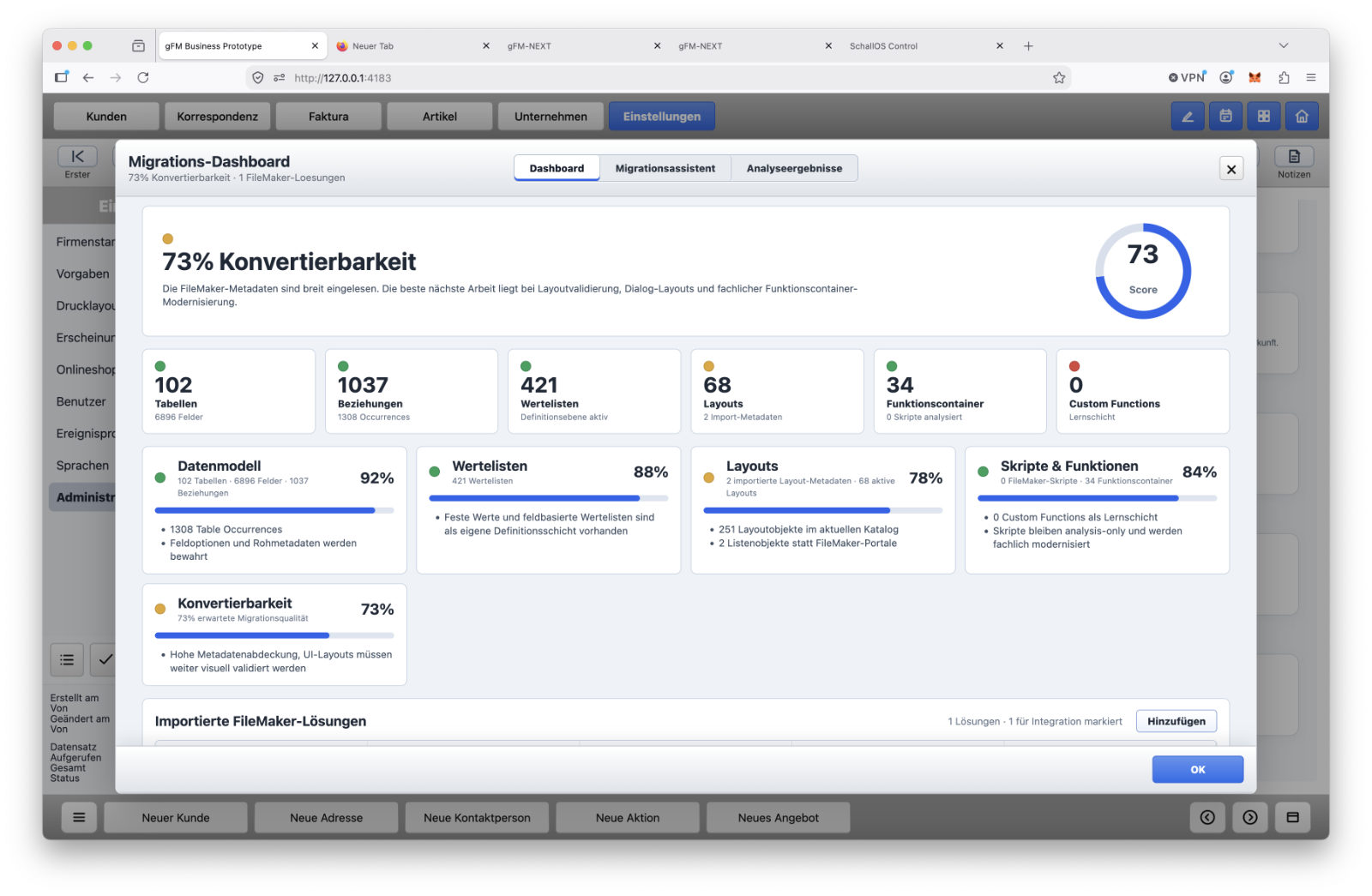
Independent Operation After Migration
After a complete migration, neither FileMaker Pro nor FileMaker Server nor WebDirect will be required. The new application uses SchallOS Runtime, the SSC as a structure container, and the SSD for production data. Formulas, function containers, multilingual support, documentation, event logs, and updates are provided by the SchallOS platform.
Depending on your requirements, the solution can be run locally as a Windows or macOS application, on your own server, or as a SaaS offering in SchallOS Cloud.
This puts an end to the reliance on a single proprietary runtime environment. Technical dependencies do not disappear entirely as a result—all modern software requires operating systems, databases, and server services. However, the structure, business logic, and data remain portable and can be run using documented adapters and deployment methods.
New Opportunities for FileMaker Developers
For FileMaker developers, SchallOS is not intended to represent a complete break from previous working methods. Knowledge of data models, layout design, and business processes remains valuable.
The main change involves the implementation of the program logic. Long chains of scripts are being replaced by semantically described function containers. The AI generates the executable code based on defined tasks, parameters, and constraints. The developer reviews the result and remains responsible for the architecture and business accuracy.
Greater attention is also being paid to the development history. Changes can be automatically logged, documented, and grouped into releases. The same update pipeline used to update SchallOS itself is also available for custom customer solutions.
As a result, the work is shifting in part from the manual entry of individual program steps to the precise description, verification, and structuring of business processes.
Not just for migrated applications
The FileMaker migration remains an important part of SchallOS, but it is not its only use. New applications can be developed entirely in SchallOS Studio.
In the long term, additional source systems could also be supported. However, each such expansion requires its own analysis and migration procedures. Different development platforms have their own approaches that cannot be adequately addressed by a superficial, one-size-fits-all import.
The experience gained from the FileMaker migration provides a foundation for this. However, the primary purpose of SchallOS is the development and operation of independent business applications.
Scheduled launch in fall 2026
The public launch of SchallOS is scheduled for fall 2026. Until then, the core platform components will continue to be integrated, tested, and prepared for the first production use cases. Not every feature planned for the long term will be fully developed by the launch date. What is crucial is a robust core upon which additional database adapters, AI functions, migration options, and operating models can be built in a controlled manner.
First, the gFM-NEXT ERP Software from gofilemaker.de scheduled for release on the new SchallOS platform in September 2026. The launch of the SchallOS development platform a little later in the fall of 2026 should therefore not mark the end of development, but rather the beginning of practical use.
The Complete Lifecycle of an Application
SchallOS began by asking how existing FileMaker solutions could be adapted to a modern environment. This led to the creation of a platform that addresses not only migration and development, but also documentation, deployment, data management, updates, and long-term operation. Studio, Runtime, Control, and Cloud each handle clearly distinct tasks within a shared architecture. The goal, therefore, is not simply to replace FileMaker with a different development tool. SchallOS aims to combine the proven proximity between developers, data, and the user interface with portable containers, AI-assisted programming, and a consistent operational model.
The FileMaker DNA serves as the starting point. The goal is to create an independent platform on which existing and new business applications can be developed, operated, and maintained over the long term.




Frequently asked questions
What exactly is SchallOS, and how does it differ from a traditional database application?
SchallOS is a platform for developing, running, and managing custom business software. It includes not only tables, layouts, and functions, but also AI-powered programming, documentation, event logs, deployment, and updates. SchallOS Studio is used for development, Runtime executes finished applications, Control manages installations, and Cloud delivers solutions as SaaS. In this way, the platform supports an application from its creation through to long-term operation.
Who is SchallOS intended for—developers or companies?
SchallOS is aimed specifically at FileMaker developers, software companies, and developers of custom business applications. Companies with existing FileMaker solutions also have the opportunity to gradually migrate their applications to an independent environment. In addition, new solutions can be developed entirely within SchallOS. Of particular interest to executives and technical decision-makers is that development, operation, documentation, updates, and various deployment models are all organized within a single platform.
Is SchallOS mainly a replacement for FileMaker?
FileMaker is an important starting point, but not the long-term technical foundation of SchallOS. Proven concepts such as visual development and the close integration of data, layouts, and functions are incorporated. However, the runtime, data storage, functional logic, and update infrastructure are built from scratch. SchallOS can migrate existing FileMaker solutions but is equally suitable for new applications. After a complete migration, FileMaker is no longer required for production operations.
Can my existing FileMaker solution be migrated fully automatically?
Tables, fields, relationships, layouts, and other defined structures can be imported largely automatically. However, additional verification is required for complex business logic. FileMaker scripts often contain layout changes, global variables, plugins, or special cases that have arisen over time. AI can analyze these processes and create new function containers based on them. Nevertheless, a comprehensive solution should be reviewed by a developer and refined as necessary. The migration significantly reduces manual effort but does not replace a technical understanding of the application.
What happens to the existing FileMaker scripts after the migration?
The scripts can remain in the background of the new function containers as a learning and reference layer. However, they are not executed unchanged. The AI analyzes which business task a script performs, which fields it uses, and which conditions it checks. It then programs the new executable code to fit the SchallOS architecture. The original script is retained as a historical knowledge source and can still be taken into account for future questions or enhancements.
What are SSC and SSD, and why does a solution need two containers?
The SSC contains the application structure, including tables, fields, layouts, formulas, function containers, languages, and documentation. The SSD contains the production data, such as customers, items, orders, or invoices. Both containers belong together but serve different purposes. This separation makes it possible to create new structural versions without replacing the entire data set. In addition, data management, backups, and operating models can be modified without having to completely redevelop the application.
What are the advantages of separating structure and data?
This allows updates, backups, and migrations to be carried out in a much more controlled manner. A new SSC can be released while the SSD containing the customer data remains intact. Necessary structural changes are implemented through defined data migrations. The SSC can also be analyzed or handed over to another developer without revealing confidential business data. Switching from IndexedDB to SQLite, PostgreSQL, or the cloud is also made easier because layouts and functional logic do not need to be rebuilt.
Can the same solution be run locally, on a server, and in the cloud?
Basically, yes. A SchallOS solution can be run locally in a browser, as a Windows or macOS application, with SQLite, on a PostgreSQL server, or as SaaS in SchallOS Cloud. The business functionality remains the same. However, different deployment models have their own requirements for multi-user operation, backup, performance, and administration. A switch is therefore carried out in a controlled manner through data transfer and validation. The SSC/SSD architecture prevents the need to maintain a completely new project for each target.
After a successful migration, will I still need FileMaker or FileMaker Server?
No. After a complete migration, the application runs on SchallOS Runtime. Neither FileMaker Server nor WebDirect is required for browser-based operation. The previous FileMaker system can be retained for reference or archiving purposes, but it is not a prerequisite for production operation. Layouts, formulas, functions, data access, updates, and deployment are handled by SchallOS. This also eliminates the previous FileMaker runtime dependencies for the migrated application.
How is artificial intelligence integrated into SchallOS?
The AI is directly available in the formula editor, in custom functions, function containers, and in the documentation layer. It is aware not only of the current query but also of the relevant fields, tables, descriptions, and dependencies. For migrated solutions, the original FileMaker script can also serve as background knowledge. The AI can explain formulas, generate code, investigate errors, and draft documentation. The models are designed to remain interchangeable so that quality, costs, and data protection can be taken into account.
Does the AI actually write the code for the function containers?
Yes. The developer describes the task, parameters, expected result, and permitted capabilities. Based on this, the AI generates executable code. This code remains visible, verifiable, and versionable. The developer can request changes, run tests, and compare or restore previous versions. The AI thus takes on a large part of the programming work, but not the technical responsibility. Especially for business-critical processes, requirements, permissions, and potential side effects must continue to be carefully monitored.
What features does the formula editor offer?
The formula editor supports typical mathematical, logical, text-related, and date- and time-related calculations. Formulas and custom functions are evaluated in real time and can be tested immediately. The initial set of commands is smaller than FileMaker’s extensive library of functions, which has grown over many years. However, the formula environment is expandable. Missing functions can be added or implemented using custom functions. In this context as well, the integrated AI can adapt existing FileMaker formulas or develop new calculations.
What does SchallOS automatically record?
At the structural level, changes to tables, fields, layouts, formulas, and function containers are recorded. At the data level, record changes, status changes, approvals, imports, and other business events can be logged. In addition, operational events such as deployments, updates, and backups are recorded. Related development work can be grouped into change sessions and later assigned to a release. This creates a traceable history of the application, rather than just a collection of notes written after the fact.
Can SchallOS generate customer and performance reports from this data?
Yes. The integrated AI can generate technical documentation, customer reports, release notes, or performance reports from the recorded events. Multiple technical changes can be summarized into a clear description of the business benefits. The underlying events remain viewable so that the developer can review the wording. Not every change is automatically billable. Therefore, the developer retains the authority to select, evaluate, and approve the final service report.
How does the update pipeline work?
Changes are first collected in change sessions and consolidated into a release. A release may include a new SSC, necessary SSD migrations, prerequisites, signatures, checks, and rollback information. SchallOS Control checks the target instance, creates a backup, and then performs the update. After installation, the system checks whether the structure, data, and key functions match the expected state. The same basic pipeline is used for SchallOS itself and for the customer solutions developed with it.
What are the differences between Runtime, Control, and Cloud?
SchallOS Runtime executes published applications and provides layouts, formulas, and function containers. SchallOS Control manages instances, database adapters, runtime profiles, updates, and technical checks. SchallOS Cloud offers runtime and data storage as a centrally operated SaaS service. SchallOS Studio remains the primary development environment. All components use the same SSC and SSD basic structures but perform clearly distinct tasks within an application’s lifecycle.
How are rights, installations, and sensitive data protected?
User rights determine which business actions a person is permitted to perform within the solution. Runtime and capability profiles additionally define which technical functions an installation actually possesses. SSC and SSD packages can be protected with identifiers, checksums, and signatures. The AI context can also be restricted so that not all customer data is processed automatically. For particularly sensitive environments, dedicated servers or, in the future, local AI models can be used. The specific security configuration depends on the particular use case.
When is SchallOS expected to be available?
The public launch is scheduled for fall 2026. The initial focus will be on Studio and Runtime, the separation of SSC and SSD, the migration of existing FileMaker structures, formulas, custom functions, AI-programmed function containers, documentation, event logs, deployment, and updates. SchallOS Control will also play a central role in managing the installations. Not every feature planned for the long term needs to be fully developed at launch. The priority is to establish a robust core for the first production applications.