Anyone running local AI models with Ollama, LM Studio, or other applications on Apple Silicon Macs will sooner or later face a crucial question: how much can a language model be compressed without its response quality suffering? Modern AI models sometimes require enormous amounts of RAM. Through so-called quantization, this requirement can be significantly reduced, allowing even powerful models to be run on comparatively affordable hardware. However, not every compression level is equally suitable for demanding tasks.
There are significant differences between Q2, Q4, Q8, and FP16 regarding memory requirements, speed, and accuracy. These differences can be decisive, especially for complex analyses, programming tasks, or processing your own documents. This article explains the technical basics of quantization, compares common formats like GGUF and MLX, and shows how the various precision levels affect local AI systems. Practical recommendations help you find a sensible compromise between performance, memory consumption, and response quality for your own hardware and specific use case.



What quantization means for local models
Language models differ not only in their capabilities but also in the technical format in which they are provided. These formats determine how a model is stored, loaded, and used—and whether it is even runnable on a specific system. For local use in tools like Ollama, LM Studio, or Llama.cpp, the GGUF format has become established. It is compact, portable, and highly optimized for inference on various platforms.
GGUF models are mostly quantized, which means that the internal numerical values are stored with reduced precision, such as 4-bit or 8-bit. This allows models that were originally 30 to 50 GB in size to be compressed to 5 to 10 GB—with only minimal loss in quality. The advantage: GGUF runs on almost any system, from macOS to Windows to Linux, without requiring a special GPU. The disadvantage: The format is not intended for training or fine-tuning, but exclusively for pure usage.
In addition to GGUF, there are other formats. MLX is Apple's own open-source framework for machine learning on Apple Silicon. It was specifically developed to leverage the full power of the CPU, GPU, and Neural Engine in M-series chips. MLX models are usually provided in the native MLX format or converted from other formats. The advantage: Maximum performance and energy efficiency on Apple hardware. The disadvantage: The ecosystem is still relatively young, and there are fewer community models available than with GGUF or PyTorch.
Safetensors comes from the PyTorch world and is strongly promoted by Hugging Face. It is a secure, binary storage format for large models that does not allow code execution—hence the name „safe.“ The advantage: Very fast to load, memory-efficient, and standardized. The disadvantage: It is primarily intended for frameworks like PyTorch or TensorFlow, so it is more common in developer environments and for training processes. It is not compatible with direct use with Ollama or MLX.
Quantization explained simply: Why AI needs less memory | bitsight
Q4, Q8, and FP16: The most important levels compared
Common quantization levels differ significantly in their accuracy and memory requirements. Ollama uses 4-bit quantization by default, which means that the number after the „q“ indicates the number of bits used for quantization. The higher the number, the more accurate the model, but the slower it runs and the more memory it requires. If you encounter problems with higher quantization levels, it is recommended to use the q4 model or close programs that consume a lot of memory.
8-bit quantization offers an uncomplicated way to reduce costs without compromising quality. By reducing the model size by about four times compared to FP32, performance remains nearly the same, with an accuracy loss of less than 1 percent. This makes it an excellent entry-level option for teams new to quantization and offers a low to moderate risk option. 4-bit quantization is also a practical option for productive use, while 2-bit is considered risky.
For developers running local models on Apple Silicon Macs, choosing a quantization level is a trade-off between memory requirements and accuracy. 8-bit quantization reduces memory requirements by 50 percent, accelerates inference by 1,8 times, and maintains over 99 percent accuracy on demanding benchmarks like HumanEval. 4-bit quantization is 11 times more efficient than 2-bit in terms of size reduction relative to quality loss. For applications where accuracy is critical, 8-bit quantization (INT8 or FP8) offers nearly lossless quality.
The impact on response quality: Where does the quality loss begin?
The quality loss at lower quantization levels is measurable and depends on the model size. In a benchmark from January 2026, the Q4_K_M (4-bit) configuration reduced the size of Mistral-7B-Instruct-v0.2 from 7,2 GB to 4,1 GB – a reduction of 43,1 percent – while the quality loss in perplexity was only 0,51 percent, which is considered nearly negligible. However, a further reduction to 2-bit (Q2_K) led to a steep accuracy loss of 7,94 percent, which is referred to as a „quality cliff.“.
The 70B variant is more sensitive to quantization. Llama 3.3 70B suffered a noticeable decline of 7,8 points on the MMLU benchmark when reduced to 4-bit. This degradation contrasts with the robustness of smaller models like the 8B version. Performance evaluations from October 2024 show that 8-bit quantized models retain 99,9 percent of the accuracy of their full-precision equivalents, while 4-bit models maintain about 98,9 percent on benchmarks like HumanEval+.
Red Hat Developer conducted over half a million evaluations and found that well-quantized models restore, on average, 99 percent of the baseline score, with all models showing at least 96 percent restoration. The response quality of quantized models remains highly competitive with their unquantized counterparts. The 95-percent confidence intervals overlap for all model sizes and quantization schemes, underscoring the minimal impact on accuracy.
RAM usage and speed on Apple Silicon
When a language model runs locally, memory (RAM or, on Apple, „Unified Memory“) is of central importance. The model itself, including weights, activations, and intermediate results, must be kept in memory. The larger the model, the more memory is required. Apple Silicon chips use „Unified Memory,“ which means that the CPU, GPU, and Neural Engine all access the same memory pool. This eliminates data copying between components, increasing efficiency and speed.
If there is not enough RAM, the system must swap or models will not load completely – which can lead to performance drops, instability, or crashes. Especially for inferential applications, such as response generation, text input, or model expansion, response time and throughput are crucial, and sufficient memory helps significantly here. A traditional desktop PC used to think in terms of „CPU RAM“ and „separate GPU RAM“ – with Apple Silicon, it is elegantly unified, making running language models particularly attractive.
For smaller models, such as those with a few billion parameters, 16 to 32 GB of RAM might suffice, especially if only single requests are to be processed. A Mac Mini with 16/32 GB would therefore be an entry point. For medium models, such as those with 3 to 10 billion parameters, or tasks with several parallel chats or larger amounts of text, one should consider 32 GB of RAM or more, e.g., Mac Studio with 32 or 48 GB. For large models, over 20 billion parameters, or if several models are to run in parallel, one could choose 64 GB or more.
It is important to plan for some buffer, as not only the model but also the operation, such as the operating system, file I/O, or other applications, requires memory reserves. For small models (1-3 billion parameters), 16-32 GB of RAM is recommended; for medium models (7-13 billion parameters), 32-64 GB; and for large models (30-70 billion parameters), 64 GB or more. This allows models like qwen3-coder:30b to be operated efficiently with 19 GB at Q4_K_M or gpt-oss:20b with 16 GB of RAM.
Practical recommendation: Which level for which use case?
The selection of the appropriate quantization level depends directly on the specific purpose and data protection requirements. Local language models are particularly suitable where confidentiality is mandatory or real-time processes are required. In practice, industries such as law or medicine rely on local solutions to process sensitive patient data or legal documents without cloud dependency. Also in book and media production or in the area of ERP systems, local models enable automatic text analysis and suggestions generated directly from the software. For engineering offices and architects, these assistants are also an advantage as they function reliably even without an internet connection. Companies generally benefit from internal chat assistants and protocol evaluations that remain entirely within their own network.
A significant practical advantage of local models over cloud services is response speed. While external APIs can be delayed by network paths or server load, local models respond in near real-time depending on the hardware. This is especially crucial for workflow in repetitive tasks or interactive processes, such as live data analysis. In the commercial sector, running on one's own machines also allows for the adaptation and fine-tuning of models with company-specific knowledge. This creates an IT landscape that utilizes modern technology without giving up sovereignty over one's own data. The decision for a specific quantization level should therefore not be viewed in isolation, but understood as part of a strategy that combines sovereignty and performance.
Quantization in RAG systems: Special considerations
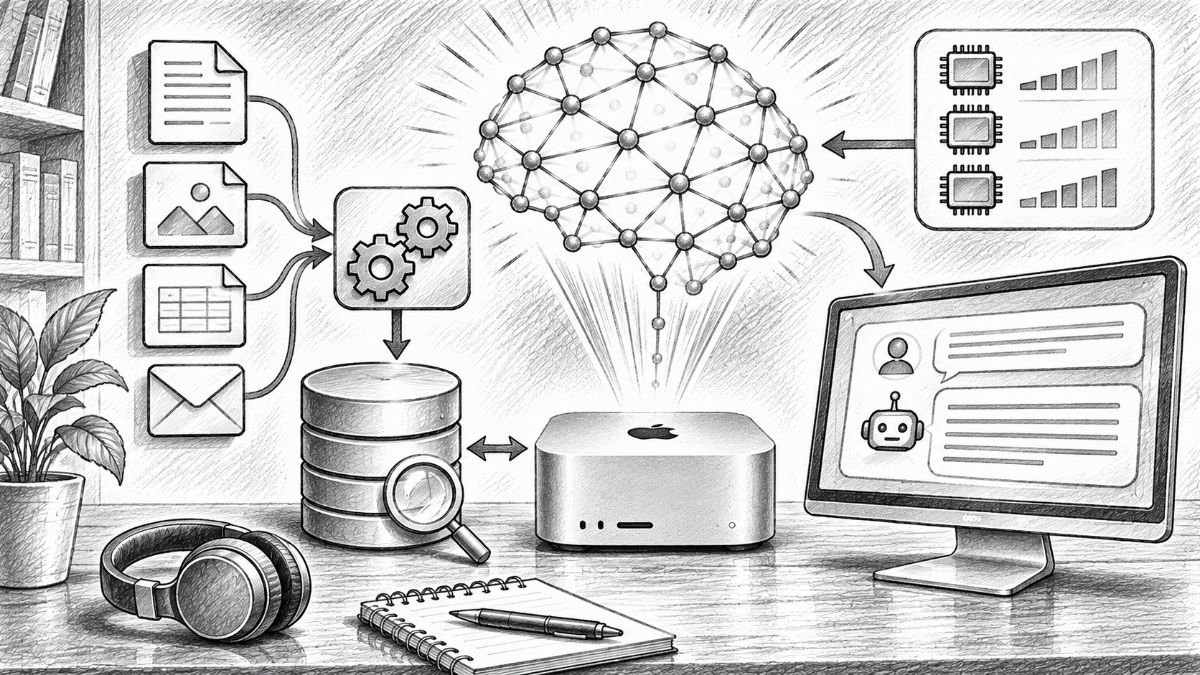
In Retrieval-Augmented Generation (RAG) systems, quantization plays a central role, as the language model is combined here with a search through document collections or databases. This process serves to increase the reliability of the generated answers and to close the model's knowledge gaps through external knowledge. RAG is particularly useful in knowledge-intensive scenarios, as it can mitigate hallucinations by having the model rely on relevant, recently retrieved information. This allows the potential of large language models to be utilized for internal data without having to perform extensive fine-tuning.
The technical implementation requires that documents are first split into smaller sections and generated in vector form (embeddings) via Ollama. These vectors are then inserted into a suitable database, such as Qdrant. When choosing the quantization level for the embedding process, it should be noted that overly aggressive compression can impair similarity calculations. In practice, one should therefore weigh whether the memory savings from lower levels justify the potential reduction in search accuracy. Often, it turns out that higher precision for the embedding models than for the generative language model itself is advantageous to ensure that the correct context pieces are retrieved.
The choice of quantization level is ultimately a compromise between resource consumption and accuracy. For RAG systems, it is necessary to bring the precision of the search and the performance of the generator into harmony to achieve reliable results.
Sources on quantization of LLMs
- Apple MLX vs. NVIDIA: How local AI inference works on the Mac
- Local AI on the Mac: How to install a language model with Ollama
- RAG with Ollama and Qdrant as a universal search engine for own data
- llama2
- We tested quantized LLMs: Cost and performance results | Latitude
- We ran over half a million evaluations on quantized LLMs—here’s what we found | Red Hat Developer
- Best Ollama Models 2026: 25+ Ranked by VRAM & SWE-Bench (October 2026) | Morph
- Retrieval Augmented Generation (RAG): Chat with your own data
- Retrieval Augmented Generation (RAG) for LLMs | Prompt Engineering Guide




Frequently asked questions about quantization of local AI models
What does quantization mean in an AI language model?
Quantization refers to a process in which the numerical precision of the model weights of an AI language model is reduced. While unquantized models often operate with 16-bit or 32-bit floating-point numbers, quantized variants, for example, use only 8, 4 or even 2 bits per weight. As a result, the required storage space decreases significantly, without the model having to be retrained from scratch. The decisive advantage is that even larger language models can be run on computers with limited RAM. For instance, a model that originally requires roughly 60 GB of storage for its weights can, through 4-bit quantization, be reduced to approximately 15 to 20 GB. The actual size depends on the quantization method used. However, information is lost during the conversion, so the answer quality can be affected to varying degrees depending on the model and use case.
What is the difference between Q2, Q4, Q8, and FP16?
The designations Q2, Q4, Q8, and FP16 describe different precision levels for storing model weights. FP16 uses 16-bit floating-point numbers and offers high numerical precision, but requires a comparatively large amount of RAM. Q8 reduces the weights to approximately 8 bits and often achieves nearly unchanged response quality with significantly lower memory requirements. Q4 primarily uses 4 bits per weight and therefore represents a particularly attractive compromise for many local applications. Memory consumption decreases significantly, while quality remains at a high level for many models. Q2 compresses even more heavily but can cause significantly greater quality losses. It is important to note that these designations only describe the basic precision. Quantization variants such as Q4_K_M use additional methods to preserve the accuracy of particularly important model weights as well as possible.
How much memory can actually be saved through quantization?
The possible memory savings depend on the original precision, the model size, and the chosen quantization method. Compared to FP16, a pure 8-bit representation requires approximately half the memory for model weights. At 4 bits, this theoretical requirement drops to about a quarter. In practice, the models are slightly larger because additional information must be stored for quantization. A language model with 30 billion parameters requires approximately 60 GB for its weights alone in FP16. A 8-bit variant requires around 30 GB, while a 4-bit version is often around 18 to 20 GB. However, these values do not describe the total memory requirement during use. Additionally, context memory, temporary calculations, and the operating system must be taken into account. Therefore, when choosing a model, sufficient memory reserves should always be planned for.
How much does Q4 quantization degrade the response quality of a language model?
With many modern language models, high-quality 4-bit quantization causes only relatively small quality losses. Especially in everyday tasks such as text summarization, translation, simple programming tasks, or general knowledge questions, the differences compared to higher-precision variants are often barely noticeable. However, the actual quality depends heavily on the respective model and the task. In complex mathematical calculations, demanding programming tasks, or multi-step logical reasoning, small numerical deviations can have larger impacts. The chosen quantization method also plays a role. Methods like Q4_K_M attempt to preserve particularly sensitive model areas with higher accuracy. For many users, Q4 is therefore a sensible starting point. Those who need particularly reliable results should test the same model in Q8 and compare the answers based on typical tasks.
When is Q8 or FP16 worth it instead of a smaller Q4 version?
Higher precision can be useful especially when a language model is intended to perform demanding tasks and sufficient RAM is available. This includes, for example, complex software development, scientific evaluations, mathematical calculations, or extensive analyses with several consecutive steps of thought. Q8 often offers a good middle ground. The model weights require approximately twice as much memory as a comparable 4-bit quantization, but the quality is usually very close to the higher-precision original version. FP16 is primarily an option when maximum numerical precision is required and the hardware can handle the significant memory demand. However, FP16 does not guarantee error-free answers. For many practical applications, a more powerful model in Q4 might be a better choice than a significantly smaller model in FP16.
Why can 2-bit quantized AI models be problematic?
With 2-bit quantization, significantly fewer gradations are available for representing the model weights than with 4 or 8 bits. This allows language models to be compressed very heavily, but important information about the connections within the neural network can be lost. These losses are not necessarily evident in simple questions. Difficulties often arise only with more complex tasks that require precise calculations, longer lines of thought, or the reliable processing of extensive information. The answers can then become less accurate, more contradictory, or less stable. It is particularly problematic that such quality losses are not always obvious. A model can continue to formulate convincingly even if its results contain factual errors. Q2 is therefore primarily suitable for experimental applications or situations with very limited memory. For demanding production systems, Q4 and Q8 are usually the more reliable basis.
What are the differences between GGUF, MLX, and Safetensors?
GGUF, MLX, and Safetensors are frequently mentioned in the context of local AI models, but they serve different purposes. GGUF is a model format that is particularly widespread in the ecosystem of llama.cpp, Ollama, and LM Studio. It supports various quantization methods and enables the execution of language models on different hardware platforms. MLX, on the other hand, is a machine learning framework developed by Apple, specifically optimized for Apple Silicon architecture. With MLX, language models can be efficiently run on Macs with M-series processors. Specially quantized model variants are also available for this purpose. Safetensors is a secure file format for storing numerical model weights. It is frequently used in the context of Hugging Face and PyTorch. The choice of format thus depends on the runtime environment being used. On Apple Silicon Macs, both GGUF and MLX models can be useful, with their speed varying depending on the model and implementation.
Do quantized AI models automatically become faster?
Not necessarily. Quantization first of all reduces the memory requirements of a model. This often means that fewer data need to be read from the RAM during processing, which can provide significant advantages, especially for memory-bandwidth-dependent calculations. On Apple Silicon Macs, this effect is particularly interesting because the CPU and GPU access a shared memory pool. Smaller model weights can be transferred and processed more efficiently. Therefore, quantized models often achieve higher speeds during text generation. However, processing quantized weights sometimes requires additional computational operations to restore suitable numerical values. Which variant is actually faster thus depends on the hardware, the software used, and the specific quantization method. In addition to pure speed in tokens per second, the time to the first response should also be considered. Especially in interactive applications, a fast response time can be more important than maximum generation performance.
Which quantization level is suitable for Macs with 16, 32, 64, or 128 GB of RAM?
The appropriate quantization depends on both the available memory capacity and the size of the desired language model. On Macs with 16 GB of Unified Memory, smaller models with a few billion parameters are especially suitable. Through Q4 quantization, even individual larger models can become usable, provided enough memory remains for the operating system and the context. With 32 GB of RAM, numerous models in the 7B to 14B class can be operated comfortably. Larger, highly quantized models are also partially possible. With 64 GB, significantly more possibilities are available for models with 30 billion parameters or more extensive context windows. Macs with 128 GB of Unified Memory also offer leeway for particularly large models, higher precision levels, and the parallel operation of several AI components. The actual model size remains the decisive factor. Number of parameters, quantization, context length, and model architecture must always be considered together.
What happens if an AI model requires more memory than the Mac can provide?
If a language model requires too much memory, macOS can attempt to swap parts of the data to the SSD. This so-called swapping can prevent an immediate program crash under certain circumstances, but it often leads to significant performance losses in memory-intensive AI applications. The reason is that even fast SSDs achieve a significantly lower data transfer rate than the internal RAM. If there must be constant switching between SSD and RAM during text generation, the response speed can drop drastically. Additionally, macOS does not provide the entire Unified Memory without restrictions for AI applications. The operating system, graphical interface, and other programs also require memory. Anyone wishing to avoid such problems should first close unused applications, reduce the context length, or use a more heavily quantized model variant. Especially with larger language models, a sufficient memory reserve is crucial for stable and smooth operation.
11. What role does quantization play in RAG systems and the processing of your own documents?
In Retrieval-Augmented Generation (RAG), language models are combined with an external knowledge source. Documents are first split into smaller sections and converted into numerical vectors using an embedding model. A vector database then enables the search for content-relevant document sections. Quantization can be used at different points. For example, the generative language model can be run in Q4 to save memory. In contrast, when using the embedding model and storing the vectors, special care must be taken to ensure that the quality of the similarity search is preserved. Too aggressive compression can lead to relevant document sections being found less effectively. Even a powerful language model might then not receive the information it needs for a correct answer. Therefore, in RAG systems, both the quality of the document search and the response quality of the language model should be checked separately.
12. How do I find the optimal quantization for my local AI system?
The best quantization cannot be determined solely by model size or a benchmark table. The decisive factor is which tasks the language model should fulfill in practical operation and what hardware is available for it. A sensible starting point is to first install a high-quality Q4 variant of the desired model. Subsequently, typical tasks should be performed, such as text summarization, programming tasks, translations, or the analysis of your own documents. During this process, it is recommended to observe response quality, speed, memory consumption, and reliability. If sufficient memory is available, the same model can additionally be tested in Q8. The results can then be compared directly. It is important to use as identical test conditions as possible for both variants. Only then will differences actually become recognizable. Ultimately, it is not the highest precision that is decisive, but the combination of sufficient quality, good speed, and stable execution on the available hardware.